| Forums | File Bank | Polls | Search | Statistics |
  ?  
You must be logged in to post content on this forum.
Tips and Tricks Light Illusion Forums / Tips and Tricks /  
 

New Custom Filter Tokens

 
Author Steve Male
INF

#1 | Posted: 4 Apr 2026 10:40 
Based on received user feedback on the new Save selection function, we have added additional Tokens to ColourSpace's Custom Filter option.

The User Guides have been updated with the information already.

See: Custom Filters
and: Point Info
and: Reduced Gamut

If any Power Users would like to test an Alpha version of ColourSpace with these new Custom Filter options, send an access request via email.

Steve
Steve Shaw
Mob Boss at Light Illusion

Author BlackJoker
ZRO

#2 | Posted: 5 Apr 2026 00:20 
EDIT: Important correction — see below. My original post contained a fundamental error about how the ColourSpace Colour Engine works. Thanks to Steve Shaw from LightIllusion for setting the record straight.

I've been spending some time diving deep into ColourSpace's Custom Filter system, specifically exploring how it can be leveraged to improve LUT accuracy before generation — rather than trying to fix things after the fact with smoothing filters.

The concept: Instead of blindly generating a LUT from a raw profile (which inevitably contains some measurement noise, especially in the near-black region), I built what I'm calling a "LUT Core Stability Filter" — a Custom Filter expression using the available constant tokens (R, G, B, L) that surgically identifies and isolates problematic measurement points while preserving all structurally critical data points that the Colour Engine needs for accurate interpolation.

The key insight is that not all profile points are created equal. Grey scale and primary ramp measurements are structural anchors — the Colour Engine relies on them for EOTF and gamut interpolation. Removing those in the name of "noise cleanup" actually degrades LUT quality. My filter protects these axes completely while only flagging the truly noisy volumetric interior patches in the shadow region — the points most susceptible to probe noise and least critical for LUT structure.

The workflow is straightforward: Apply the filter → Point Info → Save Selection → clean profile → generate LUT from that. No smoothing, no post-processing, no mathematical band-aids. Just cleaner source data going into the Colour Engine.

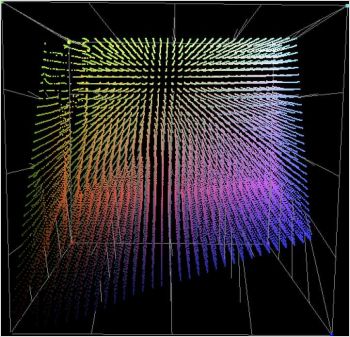
The 3D CIE graphs below show the difference. Look at the tangent lines in the shadow region — the filtered profile (second image) shows noticeably cleaner behavior with fewer stray vectors, while retaining full structural integrity across the grey axis and primaries. The LUT generated from the filtered profile produces measurably tighter results across the board.

This approach works particularly well for displays with extreme native gamuts (think triple-laser projectors targeting P3) where the gamut mapping interpolation is already under stress — feeding it cleaner source data makes a real difference.

I'm running ColourSpace HTL with a JETI 2501 and Admesy Prometheus. Would love to hear if anyone else has been experimenting with Custom Filters for pre-LUT profile optimization.

Original LUT
Original LUT
LUT Core Stability Filter - LUT

Author ColorCal Male
ZRO

#3 | Posted: 5 Apr 2026 08:50 
I've been playing with the ALPHA and the new Custom Filter capabilities.
The option to remove specific areas from the original profile is amazing with results that are really improved accuracy over the original profile.
I am deliberately using an i1D3 for the tests as that struggles with low light and wide gamut accuracy.
A really impressive capability improvement.

Edit to add that after reading BlackJoker comments above I have not found that any points are critical to LUT generation accuracy and have found that removing grey scale measurements can improve the grey scale result which is in line with the info provided on Focused Patch sets.
And Steve also suggested removing gamut edge readings as that is where probes can suffer with wide gamut displays which includes primary and secondary readings.

Author Steve Male
INF

#4 | Posted: 5 Apr 2026 09:16 
It is correct that there are no Required patch measurements for ColourSpace when using the main Peak Chroma LUT generation.
Other LUT Generation options do have requirements, as explained in the User Guides.
(But the need to use anything other than Peak Chroma would be for very specific display issues in reality.)

And yes, removing grey scale patches can indeed improve the final grey scale calibration, especially when the display's white point is not accurate or changes throughout the grey scale range.
And as said above, that is explained in the Focused Patch Sets use guide.

The same for Primary and/or Secondary measurements, and as mentioned for gamut edge measurements.

Very specifically:

The key insight is that not all profile points are created equal. Grey scale and primary ramp measurements are structural anchors — the Colour Engine relies on them for EOTF and gamut interpolation. Removing those in the name of "noise cleanup" actually degrades LUT quality.

Is NOT correct.
With ColourSpace ALL POINTS ARE ABSOLUTELY EQUAL.
And no, there are no such things as structural anchors, which is why 'Filtering' works.
And specific points are most definitely NOT used for EOTF and gamut interpolation.
Removing any point is the same as removing any other point... They are all created equal within the eyes of the ColourSpace Colour Engine.

Steve
Steve Shaw
Mob Boss at Light Illusion

Author Steve Male
INF

#5 | Posted: 5 Apr 2026 11:40 
Oh - and now Custom Filters can be Exported/Imported you can share filters with other users.
(Obviously, sharing filters would need to be based on a standard target colour space, or provide the user colour space or profile...)

Steve
Steve Shaw
Mob Boss at Light Illusion

Author BlackJoker
ZRO

#6 | Posted: 10 Apr 2026 19:22 
Custom Filters in ColourSpace + LUT Concatenation + LUT Swap — Progress Report

Here's a long-overdue update. Short answer: results are very promising — closed-loop validation on the Valerion is now complete, results and methodology documented below.

━━━━━━━━━━━━━━━━━━━━━━━━━━━━━━━━━━
Motivation & Background
━━━━━━━━━━━━━━━━━━━━━━━━━━━━━━━━━━

Two separate problems drove this work.

First: calibrating the Valerion Visionmaster Max (RGB Triple-Laser) to a DCI-P3 target means dealing with an extreme gamut spread between the projector's native colour space and the target. Peak Chroma produces visible artefacts in the 3D Cube LUT preview — a reliable indicator that the algorithm can't handle that magnitude of gamut difference cleanly.

Second: volumetric profiling sessions with the JETI 2501 Hires spectroradiometer produce systematically noisy measurement points in the shadow region (<2 cd/m²).
Standard filtering either removes too much or too little — both outcomes degrade LUT accuracy in the low end.

Two separate problems, two separate solutions — which I'm now combining into a single workflow.

━━━━━━━━━━━━━━━━━━━━━━━━━━━━━━━━━━
Setup
━━━━━━━━━━━━━━━━━━━━━━━━━━━━━━━━━━

Projector: Valerion Visionmaster Max — RGB Triple-Laser, native colour space well beyond BT.2020
Video Processor: madVR Envy Extreme MK1 (3D LUT applied after internal tone mapping → HDR target: DCI-P3 D65 Gamma 2.4)
Spectroradiometer: JETI 2501 Hires (probe match reference only)
Colorimeter: Admesy Prometheus, probe-matched to Jeti 2501 via FCVM in ColourSpace — used for all profiling
Software: ColourSpace Professional
Target colour space: DCI-P3 D65 Gamma 2.4 (SDR-equivalent on the Envy signal path)

━━━━━━━━━━━━━━━━━━━━━━━━━━━━━━━━━━
Part 1: LUT Concatenation
━━━━━━━━━━━━━━━━━━━━━━━━━━━━━━━━━━

The solution for the Valerion is LUT Concatenation — two LUTs are combined via Maths → Add in ColourSpace before being loaded as a single LUT onto the Envy:

  • Self-Calibration LUT (Peak Chroma, Profile → Native Space): corrects deviations of the projector from its own native colour space
  • Colour Space Conversion LUT (Peak Luma, P3 → Native Space): maps the P3 target colour space onto the projector's native colour space

The key advantage: Peak Chroma only operates within the native colour space — the extreme gamut jump lives entirely inside the Conversion LUT, which is designed for exactly that purpose. The preview artefacts are completely gone.

Gamut Mapping is disabled for the Valerion (native gamut exceeds P3), which also enables cleaner processing and faster multi-threaded LUT generation.

Original Peak Chroma LUT

Original

Concatenated Peak Chroma LUT

Concatenated

━━━━━━━━━━━━━━━━━━━━━━━━━━━━━━━━━━
Part 2: Custom Filter — What's Actually Possible
━━━━━━━━━━━━━━━━━━━━━━━━━━━━━━━━━━

ColourSpace's Custom Filter system is significantly more powerful than most calibrators realise. Beyond basic outlier removal, it allows highly specific, display-adaptive filtering logic that operates at the profile level — before any LUT is generated.

Without going into implementation details, the kinds of problems that can be addressed include:

Noise discrimination in the shadow region without discarding valid low-luminance measurements
Display-type-specific thresholds — what constitutes noise on a laser projector is fundamentally different from an OLED or a lamp-based display
Protecting specific measurement points from being filtered even when they fall below a general threshold — because not every low-luminance point is noise
Outlier detection relative to the display's actual measured behaviour, rather than fixed absolute limits

The net result is a cleaner profile feeding the LUT engine — and as anyone who has worked with ColourSpace's Infinite-Primary approach knows, profile quality is the actual accuracy bottleneck, not LUT generation size.

I'm keeping the implementation specifics private for now, but happy to discuss the conceptual approach and results.

Without Custom Filter

No Filter

With Custom Filter

With Filter

━━━━━━━━━━━━━━━━━━━━━━━━━━━━━━━━━━
Part 3: LUT Swap — Greyscale Optimisation via Dedicated Patch Set
━━━━━━━━━━━━━━━━━━━━━━━━━━━━━━━━━━

Even with a high-density volumetric profile, greyscale tracking accuracy is ultimately constrained by how many measurement points fall on or near the neutral axis. A general-purpose volumetric patch set distributes samples across the entire colour volume — which means the greyscale region is relatively sparse by design.

There is a second, less obvious issue: measurement duration. A full volumetric session — particularly with slower probes such as the X-Rite i1Display 3 — can take long enough that subtle display drift (thermal stabilisation, panel-level ABL behaviour, general instability) introduces inconsistency across the neutral axis measurements. The greyscale points are not measured in one continuous pass; they are distributed throughout the session and may reflect slightly different display states as a result.

The solution: a second, dedicated profiling pass using the Grey Ramp RGBCMY+ patch set — a dense grey ramp combined with grey-matched primaries and secondaries (RGBCMY). This pass is fast enough to complete within a stable display window, and gives ColourSpace a high-confidence, temporally consistent neutral axis while retaining just enough chromatic anchor points for correct gamut behaviour at the LUT boundaries.

Why this works: ColourSpace's Infinite-Primary Colour Engine treats all profile points equally — there are no structural anchors. A dense grey ramp measured within a short, stable window gives the engine significantly more reliable constraint along the neutral axis than greyscale points scattered across a multi-hour volumetric session. The result is tighter EOTF tracking and lower greyscale dE, particularly in the shadow and highlight regions where volumetric sampling is typically thinnest.

━━━━━━━━━━━━━━━━━━━━━━━━━━━━━━━━━━
Part 4: Validation Results
━━━━━━━━━━━━━━━━━━━━━━━━━━━━━━━━━━

All results below are from closed-loop measurements on the Valerion Visionmaster Max using the ADMESY Prometheus (probe-matched to JETI 2501 Hires).

Grey Scale dE76 (averaged, empirical):

Raw Profile Peak Chroma LUT with Artefacts: 0.86
Raw Profile cleaned via Custom Filter, LUT Concatenation + LUT Swap: 0.33

The improvement comes almost entirely from the D65 Shadow Bypass and LUT Swap.
Without it, chromatically neutral shadow points were being incorrectly filtered out, which introduced a subtle but measurable bias in the low-end greyscale tracking.

━━━━━━━━━━━━━━━━━━━━━━━━━━━━━━━━━━
Next Steps
━━━━━━━━━━━━━━━━━━━━━━━━━━━━━━━━━━

  • Focused Patch Set two-pass workflow as the primary optimisation path (per Steve Shaw's recommendation); Custom Filter positioned as single-pass fallback for situations where a second pass isn't practical

Questions and feedback welcome, particularly on the D65 Shadow Bypass approach, as this doesn't appear to be documented in any public Custom Filter reference
material so far.

Author DNice
ZRO

#7 | Posted: 10 Apr 2026 23:46 
BlackJoker:
First: calibrating the Valerion Visionmaster Max (RGB Triple-Laser) to a DCI-P3
target means dealing with an extreme gamut spread between the projector's native
colour space and the target. Peak Chroma produces visible artefacts in the 3D Cube
LUT preview — a reliable indicator that the algorithm can't handle that magnitude
of gamut difference cleanly.
Curious...,, why are you calibrating to P3D65? Are you using this projector in a content creation environment or have access to DCP files?

Author Steve Male
INF

#8 | Posted: 11 Apr 2026 10:29 
While the results are good, there are a number of incorrect statements/assumptions made here, but without the actual profile to assess it is impossible to be totally specific on what exactly is incorrect, and why.

But for example:

Peak Chroma produces visible artefacts in the 3D Cube LUT preview — a reliable indicator that the algorithm can't handle that magnitude of gamut difference cleanly.
Is not a correct statement.
If the LUT preview shows any artefact it will be due to either the profile containing invalid data, or that there is gamut edge clipping - the display cannot actually cover the target gamut.
The colour engine algorithms never struggle with gamut spread, if the profile data is valid, and the display can cover the target gamut.

Looking at the Original granger image shows that the display has issues in the yellow/green region, and with Gamut Mapping disabled, you will see areas of flat colour in the granger where the gamut edge issue resides. That is where gamut mapping would likely help, assuming the profile is valid with accurate data.
Unfortunately, many probes struggle with accuracy with wide gamut displays.

With the concatenation approach such gamut edge issues will be cleaned, as the second technical LUT is just a matrix, so cannot perform such volumetric corrections, and so will not show such gamut edge issues.
See the LUT Concatenation page, as well as the Matrix Profiling page.

This is also basically the same as using Map Space.

Additionally, as you hint at in the end, if the grey scale colour temp. is not accurate, the actual grey scale patches in the profile will not be the patches that are actually correcting the grey scale. So using more will not necessarily improve the final grey scale calibration.
That is why actually removing such patches from the profile can improve final grey scale calibration, as that then leaves the actual patches that are going to be used for grey scale calibration to do their work, without being impacted by off-axis patches.

And that is why Focused Patch Sets work so well with grey scale.
And which can also be used for gamut, as if the display's gamut is far greater than the target, there is no point profiling outside the target gamut...

Steve
Steve Shaw
Mob Boss at Light Illusion

Author BlackJoker
ZRO

#9 | Posted: 16 Apr 2026 19:27 
Thanks Steve for reviewing an earlier draft and correcting several incorrect assumptions — specifically around Peak Chroma behaviour, why concatenation actually works, and the counter-intuitive relationship between greyscale patch count and final greyscale accuracy. The revised framing throughout reflects these clarifications.

Author BlackJoker
ZRO

#10 | Posted: 16 Apr 2026 19:30 
DNice:
Curious...,, why are you calibrating to P3D65? Are you using this projector in a content creation environment or have access to DCP files?
Good question — it's specifically about the madVR Envy signal chain, not a content creation context.

The Envy performs HDR-to-SDR tone mapping internally, before the 3D LUT stage. Post tone-mapping, the signal delivered to the LUT is effectively SDR-range luminance in a P3 D65 container with Gamma 2.4 — which is madVR Labs' documented recommended calibration target for the Envy's HDR output path. The Envy isn't passing through PQ ST2084 at the LUT stage; it's already tone-mapped and normalised by the time the LUT
operates on it.

So to directly answer: no DCP workflow, no content creation — it's purely a consumer HT playback chain, and P3 D65 Gamma 2.4 is the correct target for the post-tone-mapped HDR signal on this specific processor. For a display fed raw HDR10 without intermediate tone mapping, the target would obviously be different.

Author DNice
ZRO

#11 | Posted: 16 Apr 2026 21:09 
BlackJoker:
Good question — it's specifically about the madVR Envy signal chain, not a content creation context.

The Envy performs HDR-to-SDR tone mapping internally, before the 3D LUT stage. Post tone-mapping, the signal delivered to the LUT is effectively SDR-range luminance in a P3 D65 container with Gamma 2.4 — which is madVR Labs' documented recommended calibration target for the Envy's HDR output path. The Envy isn't passing through PQ ST2084 at the LUT stage; it's already tone-mapped and normalised by the time the LUT
operates on it.
Most of MadVR Lab's docs are designed for non LUT calibrations. Gamma 2.4 is only recommended if you are not doing a LUT calibration. If you are doing 3DLUTs, it should always be 2.2 for HDR. I am not following you with the container comment nor tone mapping (tone mapping has nothing to do with colorimetry targets/conversions). Are you loading the 2020, 2020 and P3 or only P3 for HDR?

Author BlackJoker
ZRO

#12 | Posted: Today 11:13 
DNice:
Most of MadVR Lab's docs are designed for non LUT calibrations. Gamma 2.4 is only recommended if you are not doing a LUT calibration. If you are doing 3DLUTs, it should always be 2.2 for HDR. I am not following you with the container comment nor tone mapping (tone mapping has nothing to do with colorimetry targets/conversions). Are you loading the 2020, 2020 and P3 or only P3 for HDR?
This comes directly from madVR see attached. Where do see the information to use always 2.2 for HDR?


Author BlackJoker
ZRO

#13 | Posted: Today 11:23 
A few points from the official madVR Envy Calibration Guide for ColourSpace (Rev 1.01) that don't quite line up with your reading:

On «most of madVR Labs' docs are designed for non-LUT calibrations» — the primary document we're all referencing is the 3D LUT calibration guide. Its stated scope (p. 2): «how LightIllusion's ColourSpace can be used to calibrate a display using the madVR Envy's 3D LUT capabilities.» Non-LUT calibration isn't really the focus.

On «gamma 2.4 is only recommended if you are not doing a LUT calibration» / «always 2.2 for HDR» — the guide explicitly permits 2.4 for 3D LUT HDR calibration. Page 5, verbatim:

«By default, ColourSpace will sent Envy a LUT targeted at a gamma 2.2. However, if you target a gamma other than 2.2, such as 2.4, you must enter the target gamma value in the ColourSpace settings, otherwise the HDR image will appear too dark.»

And p. 4: «The display gamma can be set based on user preference, however the HDR calibration workflow in this guide uses a 2.2 gamma.»
So 2.2 is the documented default and the value the example workflow uses — but 2.4 is a supported target as long as you also set the gamma value in ColourSpace Settings so the LUT and Envy output are aligned. «Always 2.2» is stronger than what the guide actually states.

On «tone mapping has nothing to do with colorimetry targets/conversions» — in the Envy signal chain this isn't quite right. Envy applies HDR tone mapping before the 3D LUT, so the LUT operates on already tone-mapped output. That's exactly why the HDR calibration target is a power-law gamma rather than PQ ST2084: by the time the LUT sees the signal, Envy has already converted the absolute-luminance PQ encoding into a display-referred, relative signal. The guide addresses this directly (p. 4): «the Envy will apply tone mapping for HDR content so the gamma is dynamic in this case.»
Tone mapping's position in the chain is precisely the reason we target 2.2 or 2.4 power law instead of PQ for HDR. The two topics aren't independent.

Happy to be pointed at a later revision or madVR communication if something has changed, but that's what the current official guide documents.

Tips and Tricks Light Illusion Forums / Tips and Tricks /
 New Custom Filter Tokens


Online now: Guests - 2
Members - 0
Max. ever online: 380 [24 Mar 2026 21:54]
Guests - 380 / Members - 0