For users looking for the ultimate in calibration accuracy - gaining the last few % of accuracy - ColourSpace provides access to a totally unique Focused Patch Set profiling capability that focuses on the Target colour space, making sure all profile measurements are tailored towards generating the best possible 3D calibration LUT.
Focused Patch Sets really do enhance the final calibration accuracy.
See also Reduced Gamut Profiling.
Focused Patch Sets
ColourSpace's totally unique Focused Patch Sets really do generate the ultimate in calibration accuracy, maximising the achievable calibration result attainable for any given target colour space via Peak Chroma and Peak Luma LUT Generation.
Hybrid, Fit Space and Map Space use different approaches to LUT Generation and any patch sets to be used with those processes must have Black, White, Red, Green, and Blue patches at 100% saturation added (not necessarily 100% peak Red, Green, Blue), and Fit Space and Map Space will not work with small profiles.
This Focused Patch Set capability uses a two-pass profiling approach, using a first profile pass to define the required colour patches for a second, focused profiling pass, and generates unheard of levels of calibration accuracy!
Add Focused Grey Scale To Default Patch Sets
The first and most obvious use for a Focused Patch Set is to add just a Focused Grey Scale to an existing patch set.
- Profile an uncalibrated/native display with the desired patch set, such as large Grey Ramp RGB
(Although only a Focused grey scale is to be generated, any patch set can be used for the initial profile) - Make a LUT targeting the correct colour space (e.g. Rec709), and save it
- Export a large Grey Ramp RGB patch set through the LUT via the Active LUT option
(Any Grey Ramp patch set can be used, including User Defined, and needn't include RGB patches) - Add the new Focused Grey Scale Patches to the desired default patch set, and profile the display
(The RGB patches can be discarded)
(Alternatively, use Add/Modify Points, or Manual Measure/Presets, to combine the two patch sets) - Make a LUT to the target colour space (e.g. Rec709) via Peak Chroma, and load into the display
- Verify the final calibration...
The Focused Grey Scale Patches will improve the accuracy of the grey scale during LUT generation.
Full Focused Patch Set Workflow
The following defines the basic approach to the generation of a full Focused Patch Set, using the in-built cube based profiling. However, as should be expected, any volumetric patch sets can be used - including User Generated patch sets.
Note: Full Focused Patch Sets should ideally only be used on displays where the native gamut fully covers the target gamut. See Reduced Gamut Displays below for information on how to deal with displays where the native gamut is smaller than the target.
- Profile an uncalibrated/native display with the required patch set
(The example here uses a 213 patch set as a direct comparison to the Focused Patch Set, but any patch set can be used for the initial profiling, including User Defined, as well as Quick Profiles) - Make a LUT targeting the correct colour space (e.g. Rec709), and save it
- Use the generated LUT to export a new, focused patch set, via the Active LUT option and Characterisations Custom Sequences
(Any volumetric patch set within Characterisation can be used, including User Defined patch sets) - If desired, add a standard Grey Scale set of patches to the Focused Patch Set, to enable standard graph operation
- Re-profile the uncalibrated/native display with the new focused patch set
(Measure a Grey Scale using Manual Measure, if one was not added to the Focused Patch Set, as above) - Make a LUT to the target colour space (e.g. Rec709) via Peak Chroma, and load into the display
- Verify the final calibration...
Once a Focused Patch Set has been generated for a specific display/TV/projector model, that new Focused Patch Set can potentially be used on any display/TV/projector of the same model...
For ultimate calibration accuracy it will always be preferable to generate a new Focused Patch Set on every individual display/TV/projector, but the benefit of using a pre-generated Focused Patch Set on any display/TV/projectors of the same model will still offer improvements over default patch sets.
Note: A generated Focused Patch Set will likely not have pure grey scale triplets (patches with equal RGB triplet values), and as such will not plot RGB Balance, EOTF graphs, etc., as such graphs expect the patch RGB triplet to contain equal RGB data. To enable correct graph plotting, a Grey Scale should be added to the Focused Patch Set as defined above.
It should be realised that there is actually no such thing as a grey scale separate from the whole gamut volume. Plotting grey scale separately is simply a subjective construct defined to attempt to assist the understanding of colour with reference to calibration assessment.
From the above it should also be possible to realise that a Focused Patch Set can be inserted into a standard patch set, as a form of augmentation. For example, if a 103 patch set is initially used, the focused patch set generated could be merged back into it, to build a larger patch set, combining all patches. Identical to the method to add Focused Grey Scale to a default patch set.
Result Comparison
The following graphs directly compare a Standard profile based calibration result, with the results of a Focused Patch Set, as defined above. The benefit of the Focused Patch Set is obvious, even though for this display the standard profiling approach generates a very impressive calibration result.


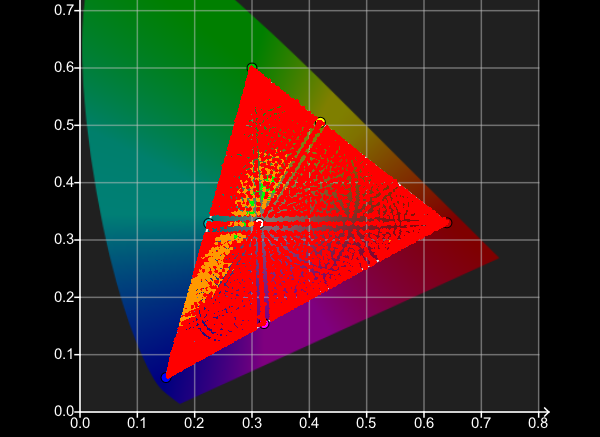
As can be seen above, using the Focused Patch Set all profile measurements are targeted at Rec709 gamut, with no unnecessary measurements made.


The above CIE Chart Verification profiles show the subtle, but measurable, improvement in the final display calibration. While calibration with the Default patch set is very good, with an average dE2000 value of just 0.3086, the Focused patch set generates an average dE2000 value of 0.2502.
(Click the graphs to direct compare them.)


The above RGB Balance Chart Verification profiles also show the subtle, but measurable, improvement in the final display calibration, with the Default patch set showing an average grey scale dE2000 value of 0.6849, and the Focused patch set generating an average grey scale dE2000 value of 0.6183.
(Click the graphs to direct compare them.)
Reduced Gamut Displays
When calibrating a display to a target gamut that is larger than the native gamut of the display a slightly different approach is required when generating a Full Focused Patch Set, in a similar way to Reduced Gamut Profiling.
With a display with a gamut smaller than the target colour space the LUT used to generate the Focused Patch Set will compress patch triplet values for patches that originally aimed to measure colours outside the display's native gamut. These compressed patches in the Focused Patch Set would need to be removed.
Rather than remove the patches, which would be a rather laborious manual task, it is easier to first generate a Reduced Gamut Patch Set via Reduced Gamut Profiling that is constrained within the display's native gamut vs the target gamut.
- Extract the native colour space from the display's original profile via Library/Modify/Extract
- Edit the Extracted colour space to have standard white coordinates and EOFT values
(The white coordinates and EOTF should match the target colour space standard) - Generate a LUT with the extracted colour space as Source, and the target colour space as Destination
- Export the desired patch set through the LUT using Active LUT
This Reduced Gamut Patch Set can then be used to generate the required Focused Patch Set, as above.
Further Understanding
What should be understood from the above is that the patch set used for profiling doesn't have to cover the full gamut of the display, which means the triplet values used within the patch set do not have to include the full colour range.
To explain further, the in-built Grey Ramp RGB profile has 100% Red, Green & Blue patches, at 230 8-bit brightness levels, as can be seen in the first patch set below, the last three entries.


The second patch set has the gamut of the RGB patches reduced by approx. 25% (in 8-bit value, not measured gamut). However, both patch sets will calibrate any given display accurately, via Peak Chroma and Peak Luma, to the required target colour space, as ColourSpace understands where the reduced gamut RGB patches, and hence the associated measurements, are positioned within the full volumetric colour gamut.
Note: The above Grey Ramp RGB patch sets are used to help explain the ability for ColourSpace to work with measurements that do not cover the full display gamut - they cannot be used on their own for Focused Patch Sets, as they are not Volumetric Patch Sets.