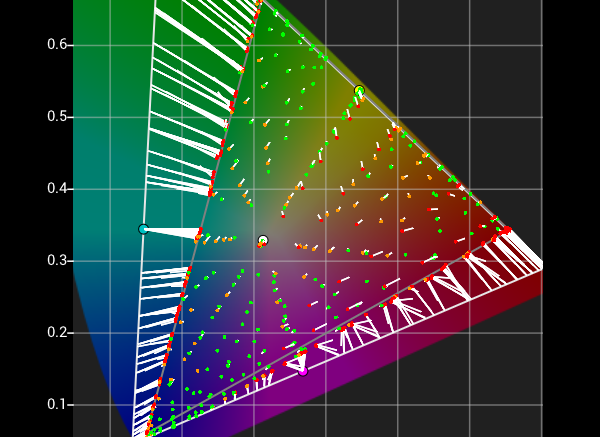
Some displays can be very difficult to calibrate accurately, especially when the display is badly pre-calibrated to a colour space it cannot make, and cannot be disabled meaning the display cannot be set to its native/uncalibrated state.
However, reduced gamut profiling can also provide accuracy benefits for normal calibration of normal displays, especially when calibrating a wide gamut display to a smaller gamut.
See also Focused Patch Sets, and Custom Filters.
Reduced Gamut Profiling
By default, ColourSpace display profiling uses a full range of patches, covering the entire colour range from black to white, and out to 100% Red, Green, and Blue, and all colour in between.
However, there is no reason the profiling patch set has to cover the full gamut range, as the volumetric location of each patch is understood by the ColourSpace Colour Engine, meaning a patch set that only covers a percentage of the full range can be used identically to the default 100% gamut coverage patch sets.
For displays that prove difficult to calibrate normally, due to inherent non-linear responses, or for displays that have a fixed internal calibration that cannot be disabled, especially those with gamut edge issue, such as being badly pre-calibrated to a gamut the display cannot accurately cover.
The missing profiling measurements are interpolated during LUT Generation via Peak Chroma or Peak Luma, just as is normal for any LUT generation within ColourSpace.
Hybrid, Fit Space and Map Space use different approaches to LUT Generation and any patch sets to be used with those processes must have Black, White, Red, Green, and Blue patches at 100% saturation added (not necessarily 100% peak Red, Green, Blue), and Fit Space and Map Space will not work with small profiles.
Additionally, Fit Space cannot work with Hint, Augment, or Drift data.
Reduced Gamut Patch Set Generation
As with any User Patch Set generation, there are numerous different ways to define a Reduced Gamut patch set. But, one of the simplest is to pass a standard patch set through a Reduced Gamut LUT.
Generating a Reduced Gamut LUT can be done in many different ways, but the two most obvious ways are:
- Technical Gamut Reduction
- Profile based Gamut Reduction
The first, Technical Gamut Reduction approach uses a standard preset colour space to generate a technical gamut reduction LUT, with the LUT then used to generate a Reduced Gamut Patch Set for actual profiling. Any preset colour space can be used, but Null is the obvious choice.
Using the CIE xy graph, setting the sliders to the desired primary colour values, with the required desaturation, generates the target xy values for the new Reduced Gamut colour space, as in the below image.
In this example the Patch Scale in Settings has been set to 16-bits, with the sliders set to 75% saturated Red value (Red at 100%, with Green & Blue set to 25%). However, total patch value accuracy for any given desaturation value is not necessary as the RGB triplet values define the patch position accurately in volumetric space.

Any Gamut Reduction can be used, with this example targeting 75% gamut.
The new colour space also needs to have the same white point and EOTF as the colour space the reduced gamut colour space is being generated from, as seen below.

Using the original colour space, and the new reduced gamut colour space, a Gamut Reduction LUT can be generated and saved.

Any Patch Set, including user generated .csv ones, can then be Exported through the LUT using the Active LUT function, generating a new .csv Patch Set that has the gamut reduction burnt into it. The example here shows a BCC patch set being generated.

The generated Gamut Reduction patch set can then be used for any display profiling as normal via Peak Chroma or Peak Luma, but will only profile the main central area of the display's gamut.
Note: The 75% value is obviously based on the patch set triplet values, not the display's available gamut, and therefore a display that is pre-calibrated to a colour space it cannot actually reach - such as Rec2020 on a display with a native gamut closer to Rec709 - the gamut the patch set covers will not be 75% of the display's actual available gamut, and a patch set with a greater gamut reduction may be required if any of the patch measurements clip at the display's gamut edge. See the Bad Pre-Calibrated Displays section below.
A generated Reduced Gamut Patch Set will not have 100% Primary RGB triplets, and as such will not plot RGB Separation, as the RGB Separation graph expect the patch RGB triplet to contain equal RGB data and match the grey scale patches. This is not an issue, as there is no requirement to be able to plot RGB Separation for LUT Generation via the default Peak Chroma option.
However, should it be desired to see the RGB Separation for the display, the required 100% primary RGB patches can be added to the Reduced Gamut set. Adding at least one each 100% saturation RGB patches will also enable Hybrid, Fit Space and Map Space to be used for LUT generation.
Example Reduced Gamut patch sets, based on the above example, for use with Peak Chroma and Peak Luma LUT Generation can be downloaded via Customer Downloads.
Bad Pre-calibrated Displays
The second, Profile based Gamut Reduction, should be used when a display is badly pre-calibrated, especially to a colour space it cannot get near to actually covering.
The following profile shows a projector that is seriously appallingly badly calibrated to Rec2020, with a native gamut that cannot even cover Rec709, due to the Blue/Green gamut axis being very low, and that cannot be set to show its true native/uncalibrated gamut.
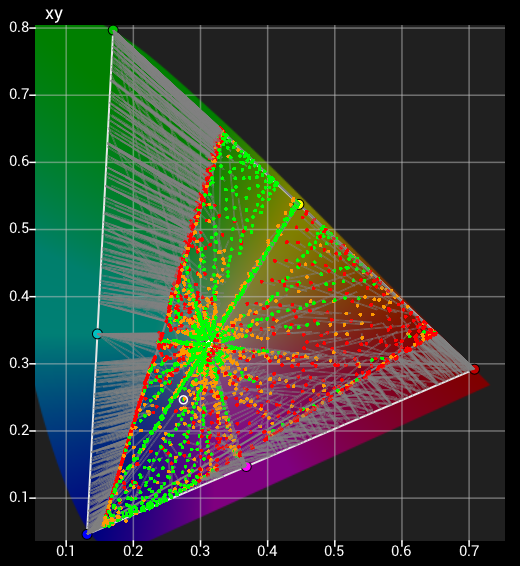
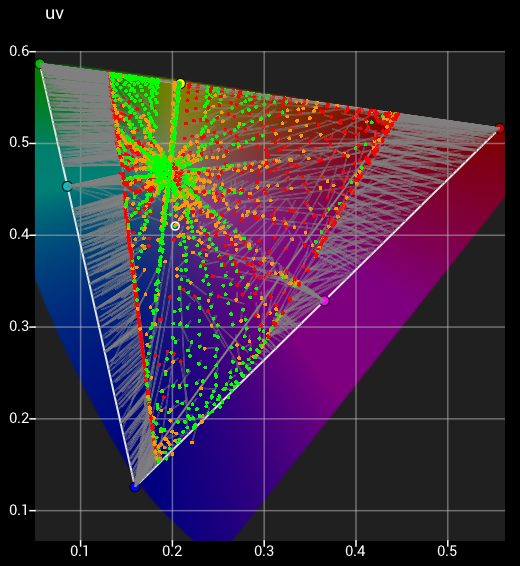
Note: The Blue/Red axis also has a bow distortion, which is a serious indicator of an appalling display, as is is technically impossible for any three colour RGB display to have anything other than straight line between primary colours, unless the underlying electronics/colour pipeline is, well, seriously crap...)
Therefore, the only way to get a decent calibration is to use a Reduced Gamut patch Set.
To define the correct colour space to use for the Reduced Gamut patch Set generation, zoom into primary Red, Green and Blue within the xy CIE diagram using the original profile, and note the xy coordinates of points that are just within the display's actual gamut, as defined by the grey gamut triangle that joins the RGB primary points.
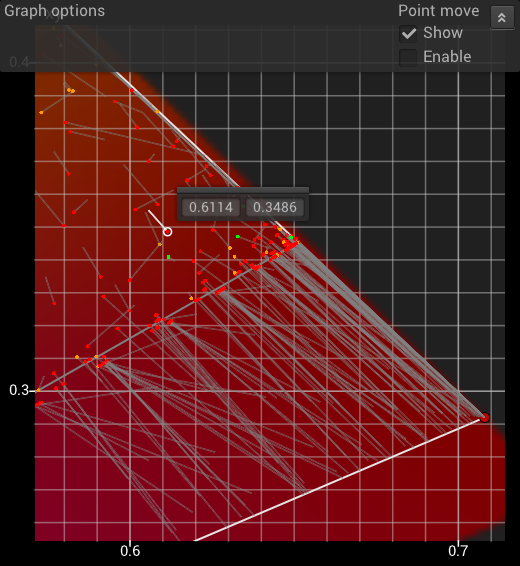
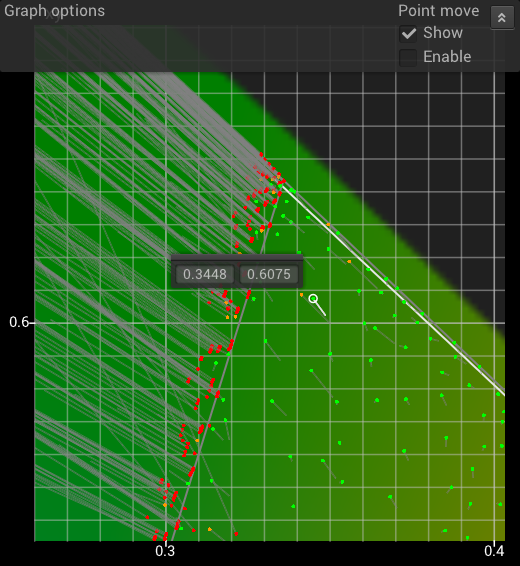
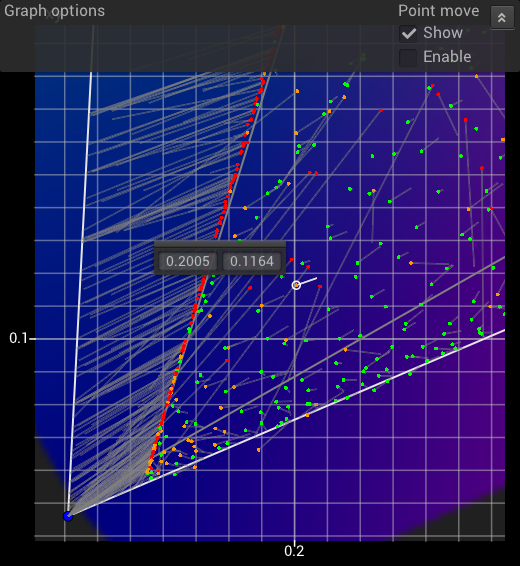
Generate a new colour space using the individual R, G, & B CIE xy coordinates.
Note: It may be necessary to define a greater gamut reduction by picking point further within the actual gamut coverage area if the display suffers excessive non-linear volumetric errors along the gamut boundaries, especially with 8-bit patch sets, as the nearest available patch value may be outside the defined gamut boundary.
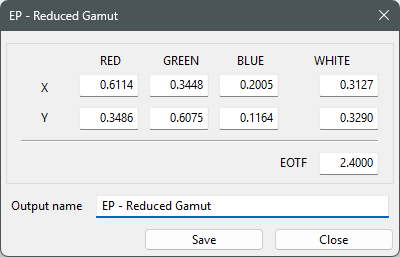
For the generated Reduced Gamut Patch Set to accurately cover the desired gamut area of the display the EOFT value used for both the modified gamut colour space and the target colour should match the actual calibrated values of the display. In this example, the EOTF is 2.4, not Rec2020's usual 2.6, with the default D65 white point, as defined above.
To help better define suitable points to extract the required RGB xy values, a large or user defined gamut sweep profile with multiple points near the gamut edge could be used, or even just manual measurements taken using the Step function in Manual Measure. In the following image the selected circled points show the prime candidate values for the new target Reduced Gamut colour space.
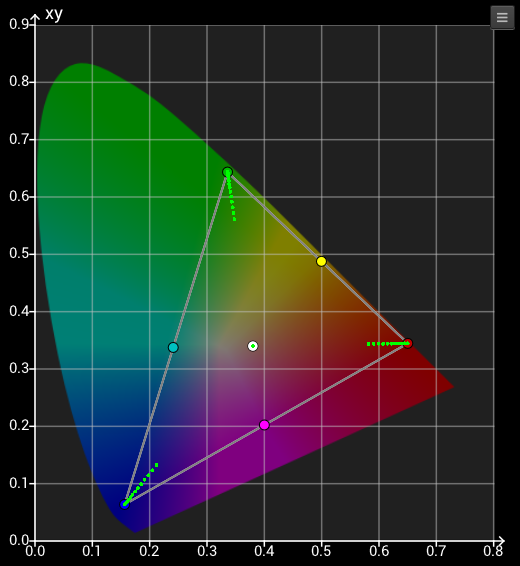
Generate a new Reduced Gamut Patch Set as defined above, but using the new Reduced Gamut Colour Space as Source, and the colour space the display is pre-calibrated to as the Destination, with the Destination colour space having the correct EOFT and white point for its pre-calibration status - Rec2020, with a 2.4 EOTF and default D65 white, in this case.
Then export your desired patch set through the Active LUT, and use the resulting Reduced Gamut .csv Patch Set to profile the display, with the resulting profile used to generate a calibration LUT as normal.
Even with a relatively small Reduced Gamut Patch Set the calibration can be greatly improved.
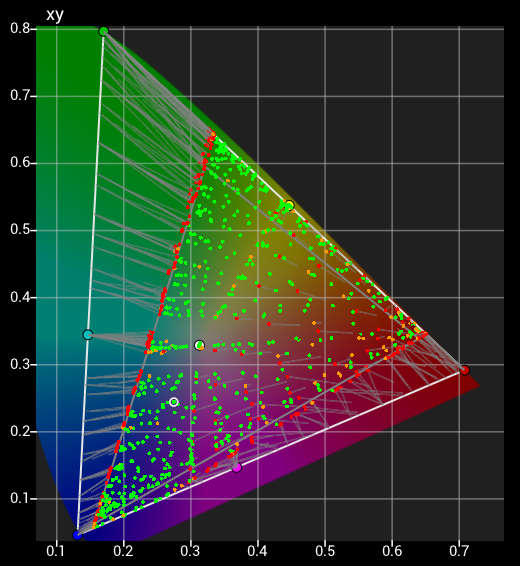
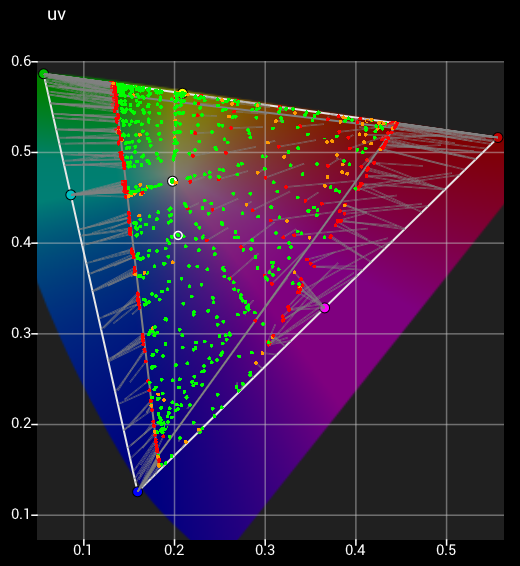
And with a larger Reduced Gamut Patch Set the result can be improved further.
An Alternative to Reduced Gamut Patch Sets
Using Custom Filters it is possible to take a standard profile, generated with any standard patch set, and filter out points that are being edge compressed by the display's existing (bad) calibration.
The following shows a standard cube profile of a JVC projector with a bad Rec2020 pre-calibration that cannot be disabled.
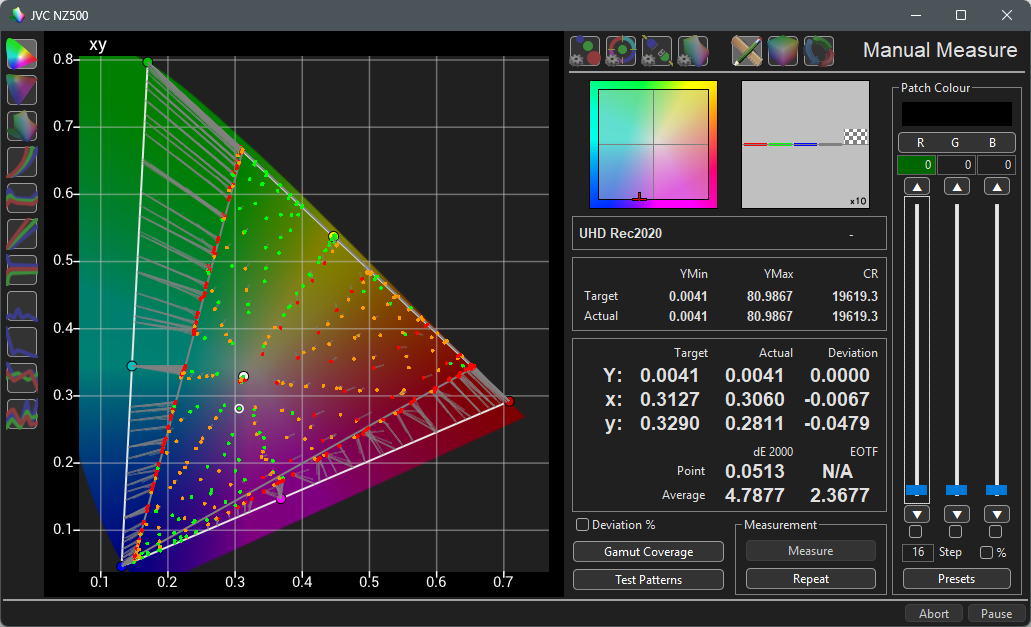
Very obviously there are a lot of measurement points that converge on the projector's actual gamut edge, which makes calibration from the profile almost impossible.
But, with a Custom Filter all bad measurement points can be removed, leaving just the valid measurement points, and a new Profile saved that can be used for accurate LUT Generation.
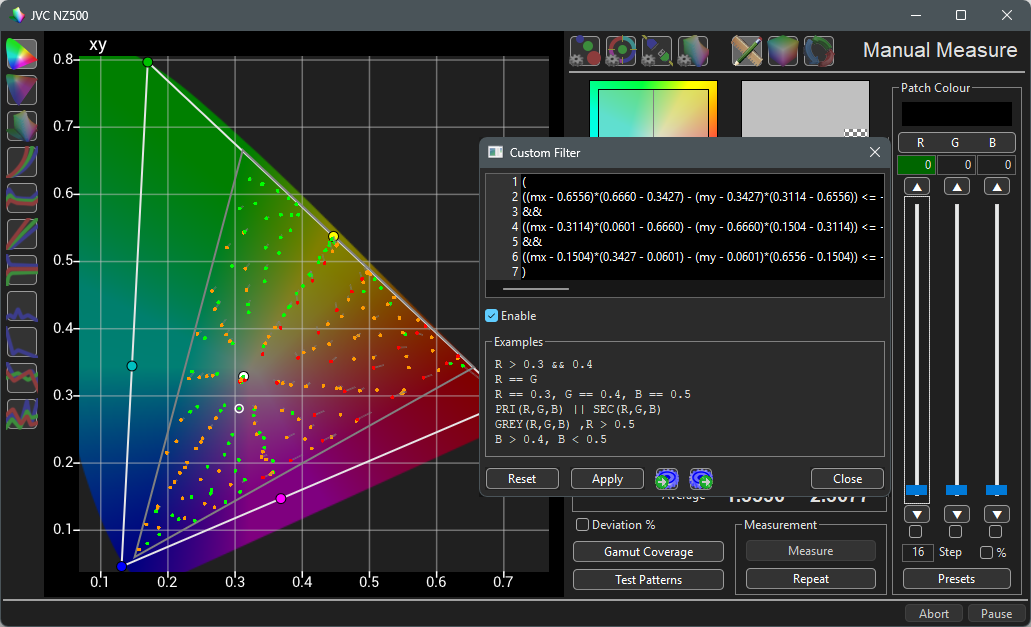
There are multiple options for isolating just the in-gamut measurements, including the specific IN_TG token, or more focused mathematical Custom Filters, as shown above.