ColourSpace can concatenate different profiles, combining the best measurement data from different profile measurement sets.
Concatenation can be used to replacing or extending grey scale measurements, or adding additional volumetric measurement into existing profiles, etc.
Profile Concatenation
Very uniquely, ColourSpace can perform many different post-profiling processes on any measurement data, and one of the totally unique capabilities is to be able to concatenate profiles, combining the best measurement data from different profile measurement sets. Using the capability to match different probes, either as part of the Extended Probe Dynamic Range workflow, or the use of different physical probes to measure different defined ranges with a display's total dynamic range, the ability to accurately concatenate different profile measurements provides an ability that is beyond any alternative calibration system.
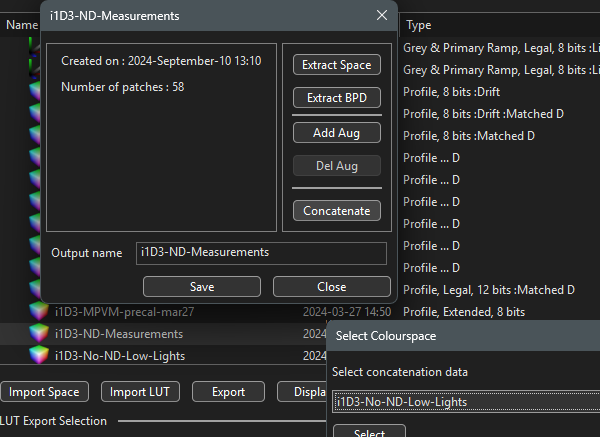
It is the Concatenation option within the Manage window that enables different Profiles to be concatenated, combining their individual measurements into one, new, concatenated profile.

Profile Concatenation is especially useful with workflows such as Extended Probe Dynamic Range, although has many additional uses, including replacing or extending grey scale measurements, adding additional volumetric measurement, etc. Effectively another method to Augment a profile with alternative additional measurements.
Profile Concatenation also works with Drift data, adding Absolute Drift values for the concatenated measurements into the final concatenated profile.
ADD/Modify Points
In addition to Profile Concatenation, new measurement data can be added to an existing profile, or existing measurement data overwritten if the points have already been measured, using the Add/Modify Points option within Characterisation.

The Add/Modify Points option is especially useful when combining readings made with different probe setting used for different components of the characterisation, such as changing Integration Time, setting different Stabilisation values, altering Patch Size, re-running a Pre-roll sequence, etc.
The Custom Filters option within Graph Options can be used to define the points to be measured within each profiling set. For a unique approach to defining patch sets via an existing profile, see Patch Sets via Profiles.
Note: Different Probe Matching settings cannot be used with the Add/Modify Points option, as the Probe Matching is applied to all points within a profile. The above Profile Concatenation approach should be used.
Combining ADD/Modify Points & Custom Filters
A very useful combination, especially for Reports, is to use the Add/Modify Points capability with Custom Filters.
For example, a volumetric profile can be combined with a specific Gamut Sweep profile into a single profile for calibration verification, and then within Reports the Custom Filter option can be used to plot two CIE graphs, one with the full volumetric profile, and one showing just the Gamut Sweep verification measurements.
See the Custom Filters page for information on the use of formulas to limit the displayed points.