Using the inherent & totally unique capabilities within ColourSpace, the Dynamic Range of ANY probe can be extended while keeping the probe's inherent low-light capability, and maintaining the same accuracy throughout the extended dynamic range, through ColourSpace's unique Multi-Point Volumetric Matching (MPVM) combined with its split-profiling capability.
Extended Probe Dynamic Range
Normally, the use of any approach to extend the peak brightness capability of any probe will have a detrimental effect on the probe's low-light capability, as every sensor used within any probe has a fixed dynamic range, so increasing the peak capability will always reduce the low-light sensitivity.
This is particularly true with the lower cost probes, such as the xrite i1D3, irrespective of the hyped-up marketing from the likes of Portrait/Calman.
Using ColourSpace it is relatively simple to use an ND filter to just increase peak brightness readings, while having no impact on lower brightness capabilities.
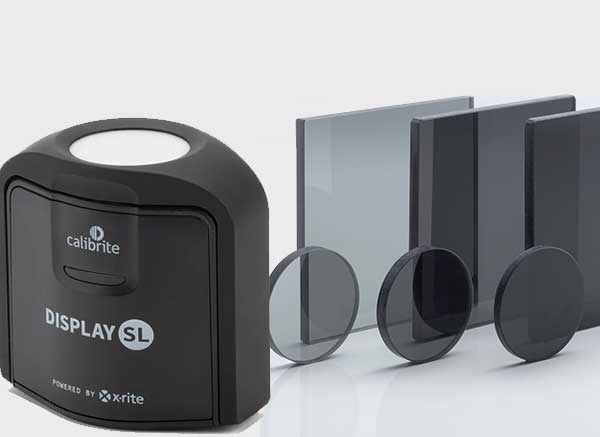

The above images show an i1D3 probe with ND filter replacing the usual plastic diffuser, with the associated magnet removed from the rotating cover.
Any probe can have its Dynamic Range extended in this way.
And as the matching of the ND Filter is performed within ColourSpace there is no requirement for the ND Filter to be matched to any given probe by the manufacturer, meaning any ND Filter can be used, and not just ones supplied by the manufacturer.
LUT Based Calibration
For LUT based calibration, the theory is very simple, and basically means talking all profile measurements with the probe in its standard state, saving the initial profile, and then re-measuring all patches over a given brightness value with the same probe, but with an ND filter applied to the probe, and concatenating both profiles into a new single profile.
When using an ND filter, Probe Matching is used to match the probe with the ND filter applied to the same probe without the filter applied, cancelling out any colour issues inherent within the ND filter.
For users with the Custom Filters option, the L constant can be used to plot just points above/below a given nits value, making is relatively simple to list all points to be re-measured with the ND filter applied.
For example, L > 950 will plot only points above 950 nits, and with the Displayed option in the Point Info window will list the patches displayed.
Note: It may be preferable to first read all patches with the ND filter applied, and then re-read just the near black patches without the ND filter.
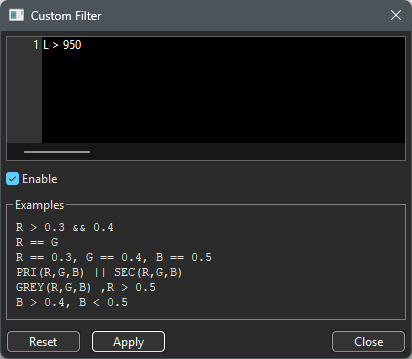


With the Custom Filter enabled, double clicking any point will pop-up the Point Info window. The displayed patches can then be exported to a new .csv patch set via the Export selection option for automated re-profiling. Just make sure Displayed is select for the point list filter.
Alternatively, and actually far more easily, the Current Point Info Selection option within Characterisation can be used to perform a new profile using just the selected point values as listed in the Point Info window.
Once generated, the new profile can be saved, with Probe Matching enabled, and concatenated with the original profile via the Concatenate option within the Library Manage option.

Probe Matching
To ensure the probe with the ND filter is accurate, a Probe Match needs to be performed using the same probe with and without the ND filter applied.

The probe match is then used to ensure the re-measured patches are accurate to the initial profile without the ND filter.
The use of Probe Matching will effectively cancel out any small colour deviations, as well as matching the measured luminance.
If a spectro is being used for probe matching, the tristimulus without the ND filter is treated as one Active probe, and the same tristimulus with the ND filter is treated as a different Active probe, and the Active probe switched between as needed for probe matching.
Note: Due to the concatenation of the two profiles, the second profile made with the ND filter applied must be saved with the Probe Match burnt in.
The patch values to use for the Probe Matching will depend on the display, as those technologies that reduce saturation with brightness increase, such as WOLEDs, will need to be matched below the point at which desaturation occurs. The RGB Separation graph can be used to define this point.
Manual Calibration
For Manual Calibration, using a display's manual adjustments, the same approach is applied, again with Probe Matching enabled for each measurement made with the ND filter applied.
The correct Probe Match must be applied as above, depending on a Spectro match being used, or not.
ND Filters
Accurate ND filters can be purchased cheaply from companies such as Knight Optical.
For those with i1D3 probes, their 25mm diameter Glass Neutral Density Filters can be fitted to the lens opening on the probe, with a bit of fiddling.
Those with a bit more mechanical ability could replace the diffuser in the rotating hood, although it is a larger diameter - just remember to also remove the magnet!
An ND filter with a 0.3 OD (Optical Density) value will effectively double the dynamic range of the probe, as ND filters reduce light transmission via a -log10 (T) formula. Other filters are stated in f-stops, where a ND 1 filter will reduce light transmission by 1 f-stop, or 50%.