Displays that are pre-calibrated, without the ability to disable the pre-calibration, cause very specific issues for accurate re-calibration.
Examples of such displays are home cinema projectors, such as from JVS, Epson, etc..
Pre-Calibration Issues
Before any LUT based calibration is attempted, all displays should be pre-set to disable any internal calibration processing, as well as to set desired black/white levels, without clipping and crushing.
The need to disable any internal colour processing is to ensure the display is set to its maximum gamut, without processing based artefacts or colour distortions, as such issues will often not be correctable with later 3D LUT based calibration.
For most displays, such a pre-setup will leave the display in the best possible state for accurate calibration.
However, some displays have inherent issues that no amount of pre-setup can alleviate, and are usually due to the display having active internal colour management that cannot be disabled. The issue may be down to the display being forced into a pre-set colour space, such as P3 or Rec2020, or having poor colour management that causes bad RGB Separation issues.
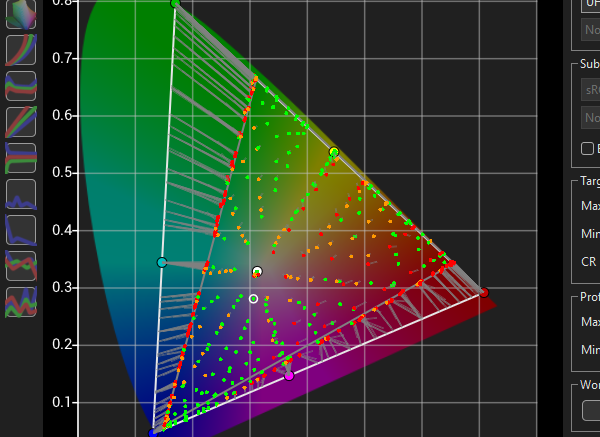
The following show just such an issue with a JVC projector when placed into wide gamut mode, as the projector is mapped into the selected colour space, which cannot be disabled to allow the display's underlying native gamut response to be used with the wide gamut filter wheel in place.
The following shows a JVC projector with obvious inherent volumetric issues, due to the application of an internal Rec2020 colour space preset, which cannot be disabled.


The above CIE charts show the basic problem with any in-built calibration, when the native gamut of the display is lower than the target colour space. The area within the Rec2020 colour space that is outside of the projector's actual achievable gamut is mapped back to the display's gamut edge. This can bee seen in the second chart, where error Tangent lines have been added to define the colour accuracy errors.
Note: There are a lot of inaccurate calibration errors within the projector's available gamut, as shown by the Red measured points and the Tangent Error lines, and these are the errors we are attempting to calibrate out via the use of an external 3D LUT.
The result with the gamut drop-off between the display's available gamut and the target Rec2020 is having multiple input colours all being mapped to the same output colour at the gamut edge. This is the real issue with the display, as secondary calibration will struggle to 'undo' having multiple input colours all mapping to the same output colour.
Note: Such gamut issues, caused by displays having in-built calibration that can't be disabled, can affect many different displays/projectors. The example here is just an example of the issues. Many JVC projectors cannot have internal calibration disabled when in wide gamut mode, but can have different colour spaces selected, so potentially lessening the gamut drop-off.
This is why being able to turn off any internal display colour management is critical for accurate re-calibration. It is exceptionally difficult to calibrate accurately on-top of an existing calibration, especially when the in-built calibration is to a sub-set of the larger target colour space.
If the display cannot be pre-set to a better level of pre-calibration set-up (basically any in-built calibration disabled), calibration can still be performed using ColourSpace through the use of a Reduced Gamut Patch Set, Focused Patch Set, or via the Sub-Space option, potentially combined with LUT Concatenation.
See: Sub-Space, Reduced Gamut Profiling specifically the Bad Pre-calibrated Displays section, and Focused Patch Sets.


