Hi Jonathon,
Thank you very much for the information. I truly appreciate it. However, I have already discovered much of it through extensive testing and trial and error.
My monitor is a true 10-bit IPS panel.
Using a correlation file for the ColorChecker Display Plus (obtained from ColorimeterCorrections and converted to CSV using `ccss2csv`), I found that after warming up the panel for 1–2 hours, the deviation from the target (peak white, D65) is approximately x 0.0000, y 0.0000 or 0.0001 when using 10-bit and the correlation file.
However, when switching to 8-bit with the same correlation file, the deviation increases to approximately x 0.0020, y 0.0012—this occurs with exactly the same RGB Gain settings in both 10-bit and 8-bit measurements. I suspect this is due to rounding errors when converting from 10-bit to 8-bit, though it may not have a practical or noticeable difference. That said, the issue I encounter is not with peak white but rather in near-dark areas.
I fully understand the 10-bit profiling issue. If we profile the display in 10-bit without the BMD 12G in-line, the profile does not account for any potential errors introduced by the BMD 12G.
On the other hand, if we use 8-bit with the BMD 12G between the PGenerator and the monitor, that setup is not as precise as 10-bit, as shown in my example above. As a result, neither option seems entirely optimal.
I always keep the BMD 12G connected via USB to the ColourSpace laptop, occasionally, I also connect it to the monitor's USB port afterward.
Video Scaling Settings
Could you please share what settings you use for Video Scaling?
Is it dependent on the monitor, or is there a general approach for BMD 12G?
I have not yet determined the correct scaling method, nor whether I need to apply two scaling options and in what order.
Unfortunately, I have not had time to test this thoroughly using images, as most of my calibration work happens late at night—often at the cost of sleep.
From my tests, enabling Clip Black results in a slightly lower (±0.02 better than Pass Black or the other options, if I remember correctly) dE2000 during the verification of 1,000 patches, but I am uncertain if this is the most accurate and correct setting for color-critical work. I tried some test patterns to analyze what each Video Scaling option does, but I don't remember the exact findings. I also recall a discussion on a thread at liftgammagain (possibly on Eizo) about a similar scaling issue on some specific model which handles 3d lut different from all others Eizos.
dE2000 Accuracy and Low-Dark Area Issues
While dE2000 is a useful metric, I've noticed that in low-dark areas, visual assessment sometimes suggests discrepancies that aren't fully reflected in the numbers.
Even when achieving dE2000 values as low as 0.15 (IPS) and 0.24 (LG OLED) 1,000-patch verification, I still notice red-tinted grays in low-dark areas on both displays, which reduces the perceived accuracy of the calibration.
To verify visually my calibration, I use the excellent patterns from TED. I also upgraded my license for TedCalibrationDisc, allowing me to use the patterns inside ColourSpace.
I've noticed that standard 10³ verification doesn't emphasize low-dark regions enough, where most issues occur. Given that IPS panels aren't known for deep blacks, particularly in dark blue areas, I'm wondering if this issue is related to my specific monitor or if my workflow needs adjustments. Surprisingly, factory calibration seems to handle dark gray areas better than my ColourSpace calibration. Obviously, those with high-end spectros and probe matching (rather than correlation files) likely achieve much better results.
Blackmagic Converters Setup Software Issue
Yesterday, I updated the Blackmagic Converters Setup software
- Help > About Converters Setup correctly shows Version 10.3.
- However, Setup > Software still lists it as Version 9.0.1.
I tried uninstalling and reinstalling, but the issue persists. I am not overly concerned about this, but I read discussions on LiftGammaGain about magenta-related issues with the BMD 12G, and I was hoping this update might have resolved them.
PGenerator Resolution and Signal Processing
Have you tested different resolutions from PGenerator to analyze how it processes the signal?
My PGenerator settings are:
- Color Format: RGB (Full)
- Colorimetry: Rec. 709
When using 2160p@24, and I display the Bars & Black Pattern, I get the correct Display Screen Correct behavior, based on the excellent guide regarding Data vs. Legal TV Levels. The relevant pattern can be found under: Pre-Calibration Tools > Bars & Black Pattern > Static (If you also have TED's patterns).
However, when switching to 1080p (at any frame rate), the Bars & Black Pattern appears clipped (like Display Screen Clipped from the guide), even though all other settings remain the same as for the 2160p signal.
When I connect the PGenerator directly to the monitor, this issue does not occur—regardless of resolution or frame rate, the Bars & Black Pattern remains correct (Display Screen Correct).
This suggests that the BMD 12G is modifying the 1080p signal in some unexpected way. I have read about different signal paths on monitors based on resolution, but that does not seem to apply here, as both signals are 1080p, and yet the BMD 12G handles them differently.
I would greatly appreciate your insights on these issues.
Best regards,
Spiros
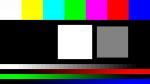
Display Screen Clipped
| 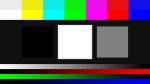
Display Screen Correct
|  |
