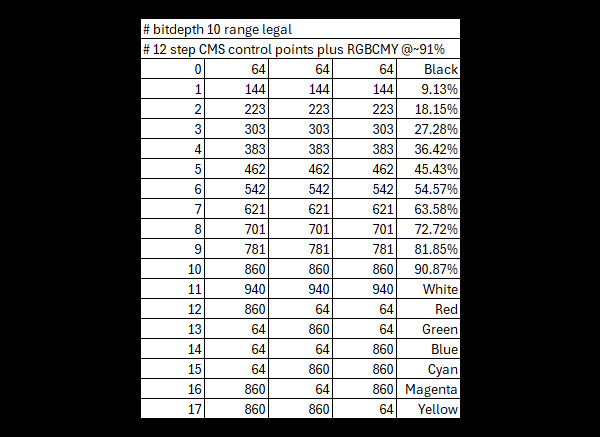
User generated patch sequence lists can be an extremely useful tool for any calibration workflow, with the ability to generate large volumetric patch sets, as well as smaller TV CMS specific control point patches .
The text based nature of the .csv files also make then extremely simple to generate and modify.
See also Characterisation Profiling and Quick Profiling, as well as TV Calibration Patch Sets.
User Generated Patch Sets
User Generated Patch Sets
Very uniquely, ColourSpace is not restricted to pre-set patch set for profiling, and users can define their own profiling sequences as needed, as .csv patch sets.
Such sequences can give very high levels of final accuracy, with far smaller patch sets, so in far quicker time scales, with a high level of final calibration granularity.
User generated .csv patch sets should match the Patch Scale and Resolution settings defined within the ColourSpace Settings menu - Legal, Extended, or Full, as well as match the bit depth, with the correct Header info stated, to guarantee expected operation.
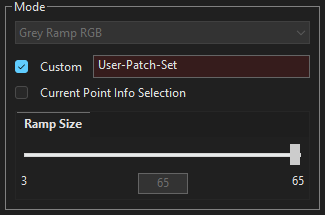
If there is a Resolution mismatch, such as an 8-bit .csv file being used with ColourSpace Resolution set to 10-bit, ColourSpace will rescale the patches as accurately as is possible, as the imported integer .csv patch list will have been converted into ColourSpace's internal float values.
With a Scale/Range mismatch the .csv file will be assumed to be Full, and the defined patch values treated as such.
As a visual indication that the Resolution and/or Scale settings set within ColourSpace do not match the bit depth and /or range values in the .csv list the patch set name window in the Characterisation menu will show a Red Tint.
Old Patch Sets
Any existing patch set should be update to include the new Header information.To aid with updating old .csv patch sets to include the required # Header data, a pop-up window will show allowing the user to set the correct parameters whenever an old .csv patch set is opened or imported into ColourSpace.
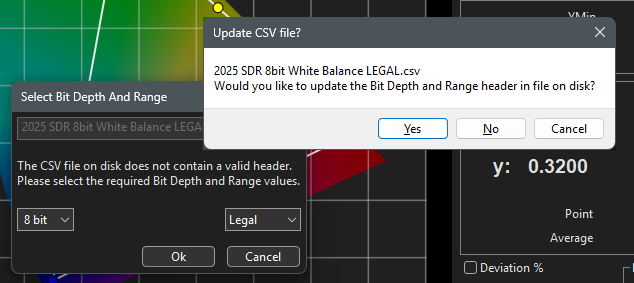
The second warning window allows for a final check that the settings are correct before confirming the update. If Cancel is used on the first warning window the selected patch set will default back to None. If Cancel is selected on the second warning window the patch set will remain selected and can be uses as is, although there is likely to be a bit depth or range mismatch.
User .csv File Parameters

With any .csv list the first numerical column defines a patch number, and can be in any order, with the following three columns defining the R, G, & B patch values, with the 5th, optional column, defining a name for each patch.
The 5th column name is useful in Manual Measure when using .csv patch sets at Presets, as hovering over the colour patch in the scrollable patch list will show both the patch vales and name as a hover tip.
Additional, any line in the .csv file can use the # character to define a notation or comment, including defining the .csv bit depth and range in the first line of the file.
The in-built profiles within ColourSpace can be exported for reference examples.
The # Bitdepth xx and Range xxxxx parameters are used to define the bit depth and range of the .csv file, and are used internally by ColourSpace when converting the .csv list to different Resolutions and Scales via the Settings menu options. If the # Bitdepth and Range parameters are not defined in a .csv file ColourSpace will attempt to determine the correct parameters in the file. However, it is possible the assumption may be incorrect, and having a mismatch between the .csv file data and ColourSpace's will then result in inaccurate profile measurements.
It is important ensure the .csv file included the # Header data, and that data matches the Resolution and Scale parameters set within ColourSpace.
Volumetric Characterisation Patch Sets
Full volumetric Characterisation user patch sets can contain as many triplet values as desired, and be fully volumetric, and need not be based on Cube spacing. The defined patches can be totally random, and focus patches on specific areas of colour volume as desired.
Volumetric patch sets can use any patch order, and when used with the UnSorted Patch Sequence Sorting will maintain the list order within the .csv file. Additionally any of the Patch Sequence Sorting algorithms within ColourSpace can be used to overwrite the defined .csv file list ordering after the .csv list has been loaded into ColourSpace.
Quick Profile Patch Sets
Any User Quick Profile .csv patch set should contain a Grey Scale and at least one each R, G, & B patches matched to a grey scale patch, and to be a valid Quick Profile should be a sequential list, although any of the Patch Sequence Sorting algorithms within ColourSpace can be used after the .csv has been loaded into ColourSpace.
The RGB/CMY patches should be of the same stimulus value, and match one of the Grey Scale (neutral) patches.
While the .csv list must match the standard sequential ordering for Quick Profiles, the list can contain additional patch values AFTER the initial Quick Profile patches, and these will be used within the profile, replacing any permuted values when performing LUT Generation.
If the Quick Profile .csv Grey Ramp patch set includes matching R, G, B & C, M, Y patch values, also matched to a grey scale patch, the Multi-Primary Colour Engine will be enabled when a LUT is generated.
For Grey, Primary & Secondary Ramp+ patch sets, there should be a matching RGBCMY patch for every Grey patch.
There are also limitations as to the number of patches that can be used based on the permuted cube size, as with the in-built Quick Profiles, with the default permuted maximum cube size being 33, although higher license levels have extended limits up to 101.
Note: In most cases, the Grey Scale patch count will define the permuted cube size.
If these values are exceeded, the profile will be saved as a standard volumetric profile.
Note: If a user generated Preset Patch List, with Full range values, is loaded into Characterisation, Custom Sequences, and re-Exported with Patch Scale set to a different range, for example, Legal, the exported patch set will be clipped accordingly.


