
ColourSpace includes two main profiling functions: full volumetric Characterisation, and the far faster Quick Profiling method. Both methods can produce excellent results, but with a great differences in profiling speed.
Quick Profiles can generate excellent results, if the display is well behaved.
See also User Patch Sets, and Characterisation Profiling.
Quick Profiles
Using a Quick Profile to perform a display characterisation is very fast as few measurements are used, but can potentially still generate very accurate 3D LUT calibration on displays with a very linear response to input signal changes, meaning the display has no non-linear volumetric errors.
The RGB Separation graph, as generated via a Grey & Primary Ramp Quick Profile, is a good indicator of a display's linearity, or not, as RGB Separation compares each primary R, G, and B patch of the same stimulus value, matching the individual RGB patch measured values to the expected colour matrix combination for the equivalent grey patch. Any error in the graph shows the display is suffering colour decoupling issues with the display's separate RGB colour channels. This means that an input colour change that should affect only a single colour channel also causes changes within the other colour channels - what is known as cross-coupling between the colour channels.

However, the RGB Separation graph alone is no guarantee that the displays is suitable for Quick Profile calibration, as can be seen in the following two graphs. The RGB Separation graph looks reasonable, while the Primary Ramps in the Cube volumetric graph show there are some serious non-linear issues with the display.
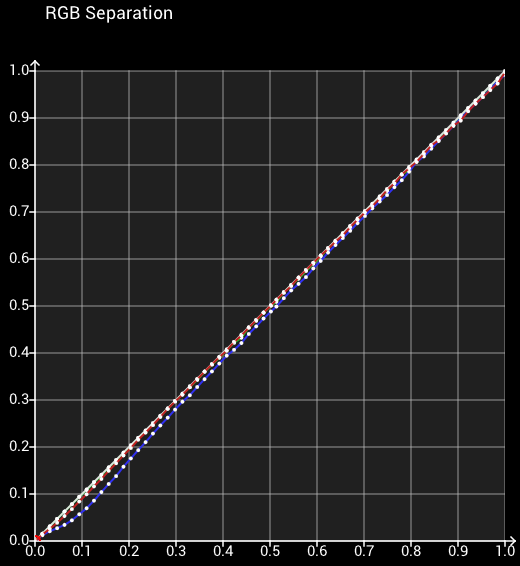
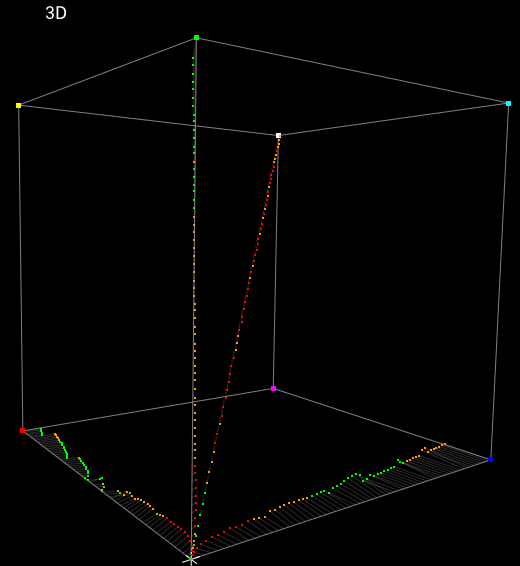
Display's with such non-linear volumetric issues cannot be accurately calibrated with a 1D LUT and 3x3 matrix, and so will likely not be accurately calibrated with a Quick Profile.
Note: A 3D LUT generated from a Quick Profile is similar in some ways to a 1D LUT and 3x3 Matrix, held within a 3D LUT, although the calibration results will far better than a 1D+Matrix calibration.
Quick Profiles can only be generated via the Characterisation menu, and not via Manual Measure, and require the use of sequential patch sorting within any user generated .csv file.
The different Quick Profile pre-sets provide standard profiling options, with the Grey Ramp options being the normal choices for LUT Generation, with Memory Colours, Gamut Sweep, and Edge Sweep being more focused on verification, although any profiles can be used for LUT Generation.
- Grey Ramp RGB (grey ramp with 1 each RGB patches)
- Grey Ramp RGBCMY+ (grey ramp with 1 each RGBCMY patches)
- Grey & Primary Ramp (matching grey and RGB ramps)
- Grey Primary & Secondary Ramp+ (matching grey and RGBCMY ramps)
- Memory Colours RGB (grey ramp with memory colours & 1 each RGB patches)
- Memory Colours RGBCMY (grey ramp with memory colours & 1 each RGBCMY patches)
- Gamut Sweep 75% Primary (grey ramp with 75% RGB gamut sweep)
- Gamut Sweep 75% Primary & Secondary (grey ramp with 75% RGBCMY gamut sweep)
- Gamut Sweep 100% Primary (grey ramp with 100% RGB gamut sweep)
- Gamut Sweep 100% Primary & Secondary (grey ramp with 10% RGBCMY gamut sweep)
- Edge Sweep (grey ramp with gamut edge patches)
Patch count sizes are variable, with higher ColourSpace license levels able to use extended patch counts depending on the LUT Generation Size defined under Preferences, up to a maximum grey scale patch count of of 101.
When using Quick Profiles for LUT Generation a different colour engine approach is used compared to standard volumetric Profiles, depending on the Quick Profile in use. Grey Ramp RGB, Grey & Primary Ramp, Memory Colours, and Gamut Sweep profiles use one specific Quick Profile colour engine, while Grey Ramp RGBCMY+ and Grey, Primary & Secondary+ Quick Profiles use a second, more advanced colour engine - see below, and Edge profiles use a third different colour engine.
The different Quick Profile colour engines permutes the grey scale patches into a full cube, and then uses the full cube data to generate the target LUT.
For example, A 33 step Grey Ramp RGB Quick Profile will generate a 35,937 point permuted cube, while A 43 step Grey Ramp will generate a 79,507 point permuted cube. Obviously the larger the permuted cube size, the more processing required for LUT Generation.
(For info, every time you double the Grey Scale patch count you will increase the required processing/memory for LUT Generation by approx. 8x.)
Therefore, the permuted cube size defines the total number of profile grey scale patches that can be used within a Quick Profile, with the default being 33, although with higher ColourSpace licenses with Multi-Threading capability the maximum size can be extended beyond the default 33 size, defined by the LUT Generation Size set via Preferences up to a 101 maximum.

If a Quick Profile is used that is over the set Permuted Cube size the above Warning message will be displayed when attempting to Save. The above warning shows a 65 point Quick Profile via a User Patch Set when ColourSpace was configured to a maximum LUT Generation Size of 48.
With higher ColourSpace license levels, depending on the pre-set Quick Profile selection there are multiple different tabs selectable to alter the available Quick Profiling mode parameters. For Quick Profiles, Ramp Size will be available for those Quick Profiles with definable ramps, and Colour Size for Gamut Sweep profiles.
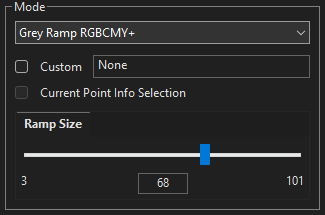

The Ramp Size tab enables setting of the ramp size for those Quick Profiles with variable ramp size capabilities.
The Colour Size tab enables setting of the Gamut Sweep size for Gamut Sweep Quick Profiles.
Note: As with all ColourSpace Sliders, clicking to either side of the slider controls will move the slider by a pre-set value, nominally a step of one depending on the granularity of the slider, acting the same as Up/Down/Left/Right buttons.
With the possibility to run very large ramp sizes, either via the in-built options, or vis user defined .csv Patch Sets, it can be tempting to assume that larger is better.
However, care needs to be taken when setting the number of patches to use, with more very often NOT being better, due ti issues with the display and potentially the probe.
- Instability in the display/probe can cause non-monotonic measurements
- Excessive patch granularity with unstable measurement causes artefacts in the generated LUT
- long measurement times can cause heat/thermal drift issues within the display/probe
- Having many near black patches can cause issues if the probe's measurements are inaccurate
Often, smaller patch counts will generate superior calibration results, especially on unstable displays.
Multi-Primary Colour Engine
Included within ColourSpace's pre-set Quick Profile patch sets are a selection that include Secondary Colours. When these Plus Patch sets are used a totally different Multi-Primary Colour Engine is used during LUT Generation.
The pre-set + patch sets include Grey Ramp RGBCMY+, and Grey, Primary & Secondary Ramp+. When these pre-sets are used the saved profiles will show as + profiles within the library.
These + Patch Sets are especially suitable for WOLED displays, such as for LG TVs, as they invoke a Multi-Primary Colour Engine, without the need for a full volumetric Cube Based profile.
The + profiles will also generate superior results with any display, compared to alternative calibration systems.

When a LUT is generated using + profiles, a unique Multi-Primary Colour Engine is used, enabling calibration accuracy far in excess of alternative options for such small patch set profiles. Often, generating results that are close to, or even equal to, large volumetric Cube Based patch set profiles.
All Cube Based profiles invoke an Infinite-Primary Colour Engine. The + profiles invoke a unique, Multi-Primary Colour Engine, enabling calibration results that are far beyond what has traditionally been possible with such small patch sets.


The above images show a direct comparison of a Grey Ramp RGB profile result vs Grey Ramp RGBCMY+, on a standard LCD display with a low blue gamut, which would otherwise require a large volumetric profile to calibrate. The improvements with the Multi-Primary Colour Engine are obvious.
The visual artefacts in the Grey Ramp RGB profile result are due to the non-Multi-Primary Colour Engine not having enough profile data to work with to understand how to process the low Blue gamut of the display. A large Volumetric Cube Based profile has the required data, so deals well with the issue.
The fact the + profile also manages the issue well shows just how powerful the Multi-Primary Colour Engine really is.
User Quick Profile Patch Sets

The Custom option within the Characterisation menu enables any .csv generated patch sequence to be loaded into ColourSpace, and used to define the patch colours during profiling.
Any User Quick Profile .csv patch set used for LUT generation should contain a Grey Scale and at least one each R, G, & B patches matched to a grey scale patch, and to be a valid Quick Profile should be a sequential list, although any of the Patch Sequence Sorting algorithms within ColourSpace can be used after the .csv has been loaded into ColourSpace.
The RGB patches should be of the same stimulus value, and match one of the Grey Scale (neutral) patches.
- 213, 16, 16 - Red
- 16, 213, 16 - Green
- 16, 16, 213 - Blue
- 213, 213, 213 - Grey
If the Quick Profile .csv Grey Ramp patch set includes matching R, G, B & C, M, Y patch values, also matched to a grey scale patch, the Multi-Primary Colour Engine will be enabled when a LUT is generated, as explained above.
For Grey, Primary & Secondary Ramp+ patch sets, there should be a matching RGBCMY patch for every Grey patch.
While when generating .csv user Quick Profile patch sets the initial patches in the .csv file must match the expected default Quick Profile sequential order, as with the in-built Quick Profiles the user patch set is based on, it is also possible to add any desired additional patches into the .csv list AFTER the standard Quick Profile patches.
There are also limitations as to the number of patches that can be used based on the permuted cube size, as with the in-built Quick Profiles, with the default permuted maximum cube size being 33, although higher license levels have extended limits up to 101.
Note: In most cases, the Grey Scale patch count will define the permuted cube size.

If these values are exceeded, the profile will be saved as a standard volumetric profile.
When a user .csv file has been imported into ColourSpace, and is Enabled, hovering over it will pop-up a tips dialogue box that will define the type of profile that will be saved, as well as the number of patches in the grey axis, the range and and bit depth, shown within square brackets.
A Red Tint to the .csv file window shows that the ColourSpace set Resolution and/or Scale doesn't match the bit depth and/or ranger of the .csv file.
Note: Any profiling performed via Manual Measure will always be treated and saved as a Profile, and not a Quick Profile.
See User Patch Sets for more information.


