
ColourSpace includes two main profiling functions: full volumetric Characterisation, and the more sparse Quick Profiling method. Both methods can produce excellent results.
however, for any given display a full Characterisation will generate superior results.
See also User Patch Sets, and Quick Profiling.
Characterisation Profiling
Within ColourSpace there are two different default Cube based volumetric Characterisation options
The traditional volumetric profiling option is Cube Based, which defines a standard cube based set of patches with the Cube size slider defining the edge size of the cube such that a value of 33 defines 35,937 patches (333).
The second option is Body Centre Cube Based, which defines a smaller offset cube within a larger cube, so that a Cube size value of 33 defines 68,705 patches (a 333 cube containing a 323 cube within it, with 65 grey scale patches).
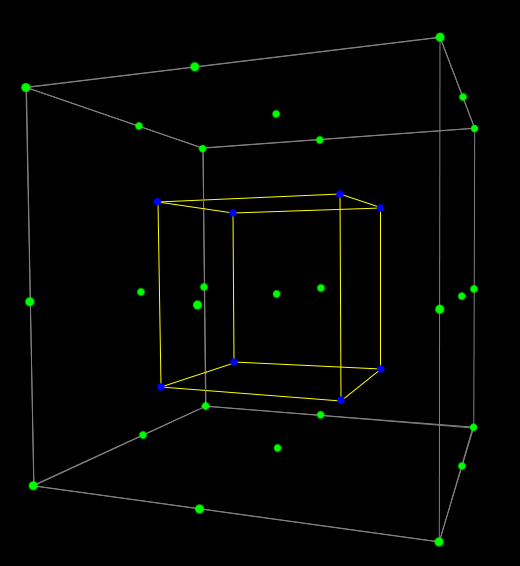
The above shows a 33 cube with a 23 within it, defining a Body Centre Cube vs a Standard Cube. The Body Centred Cube adds just 4 patches to the standard Cube's 35 patches, but greatly increases the volumetric coverage achieved. The patch set would also have a 2x-1 grey scale, so 5 grey scale patches.
The initial default max Cube profiling size for ColourSpace is 21, which can be increased to 33 within all license levels via the numeric Cube Size box, matching the native LUT Processing size. With higher ColourSpace license levels (INF/XPT/PRO LMN/LGN & HTX/HTP) it is possible to use the LUT Generation Size option from the Main Menu Preferences drop-down to define internal LUT sizes up to 2563 and beyond, with 10243 proven working, and the Cube Size slider within Characterisation can then have its maximum size value set via the numeric box to any value up to the defined LUT Generation Size, or 101, whichever is the maximum. The slider will then adopt this value as the new maximum value.
With Body Centre Cubes, the Cube Size value is the outer cube size, so for lower ColourSpace license levels is 17 maximum, as that defines a Grey Axis Size of 33.
Note: With lower ColourSpace license levels the Grey Axis Size tab is purely for information, as it cannot be adjusted.
With higher ColourSpace license levels there are different tabs selectable to alter the available profiling mode parameters. For Cube based modes the options are Cube Size and Grey Axis Size.
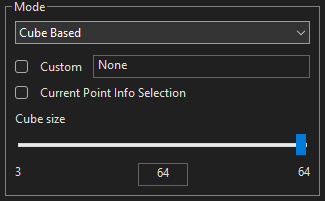
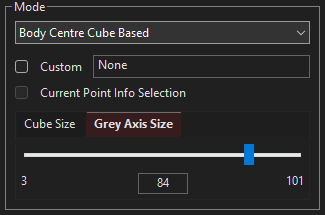
The Cube Size slider defines the patch sequence to be used when either of Cube options are selected from the drop-down list. The value used defines the cube side, so 33 defines 35,937 patches (333) for a standard Cube Based selection, and 68,705 patches for a Body Centre Cube Based selection (a 333 cube containing a 323 cube within it, with 2x-1 - 65 - grey axis patches). Values can be entered via the slider, or via the numeric value box.
The Grey Axis Size, when available, defines an independent number of patches to be used for the grey scale, up to a maximum of 101.
With higher license levels a Red tint to the Grey Axis Size tab defines the Grey Axis Size as being greater than the default Grey Axis Size value based on the defined Cube Size value. If the Cube Size is re-altered, the Grey Axis Size will default back to the default Grey Axis Size for the defined Cube Size.
The BCC (Body Centred Cube) option sets the Grey Axis Size to 2x-1 of the Cube size by default, up to a maximum grey scale size of 33 for lower ColourSpace license levels.
With higher ColourSpace licenses the Grey Axis Size can be set independently, with a Red Tint to the Grey Axis Size tab defining the value as being larger than the default for the defined Cube Size.
Note: As with all ColourSpace Sliders, clicking to either side of the slider controls will move the slider by a pre-set value, nominally a step of one depending on the granularity of the slider, acting the same as Up/Down/Left/Right buttons.
Very obviously, using large characterisation sizes will greatly increase profiling time, and with that may bring associated displays and probe stabilisation issues due to heat/thermal issues, etc.
- Instability in the display/probe can cause non-monotonic measurements
- Excessive patch granularity with unstable measurement causes artefacts in the generated LUT
- long measurement times can cause heat/thermal drift issues within the display/probe
Using Drift and Stabilisation may not be enough to manage such issues - Having many near black patches can cause issues if the probe's measurements are inaccurate
Often, smaller volumetric patch sets with medium size Grey Axis patch counts will generate superior calibration results, especially on unstable displays.
User Characterisation Patch Sets

The Custom option within the Characterisation menu enables any .csv generated patch sequence to be loaded into ColourSpace, and used to define the patch colours during profiling.
Characterisation user patch sets can contain as many triplet values as desired, and be fully volumetric, and need not be based on Cube spacing. The defined patches can be totally random, and focus patches on specific areas of colour volume as desired.
Volumetric patch sets can use any patch order, and when used with the UnSorted Patch Sequence Sorting will maintain the list order within the .csv file. Additionally any of the Patch Sequence Sorting algorithms within ColourSpace can be used to overwrite the defined .csv file list ordering after the .csv list has been loaded into ColourSpace.

When a user .csv file has been imported into ColourSpace, and is Enabled, hovering over it will pop-up a tips dialogue box that will define the type of profile that will be saved, as well as the number of patches in the grey axis, range, and bit depth shown within square brackets.
A Red Tint to the .csv file window shows that the ColourSpace set Resolution and/or Scale doesn't match the bit depth and/or ranger of the .csv file.
See User Patch Sets for more information.
Tips For User Characterisation Patch Set Generation
Due to the open & flexible nature of ColourSpace's Colour Engine there are few specific requirements for user defined patch sets, and there are some tricks that can be employed to help with difficult calibrations.
An example is generating patch sets that have a greater focus on the calibration grey scale.
Fairly obviously, adding in more grey scale patches can enhance the grey scale result, as can using the downloadable Optimised Patch Sets from Customer Downloads which include what are defined as Tube based patch sets, with a greater number of grey scale patches, including the immediate surrounding patches in a tube around the grey scale.
However, when looking to enhance grey scale accuracy the opposite can also work, by having LESS patches around the grey scale patches. This works because within ColourSpace's colour engine ALL COLOURS are treated equally. There really is no such thing a as grey scale!
As a consequence, isolating the grey scale patches from their immediate neighbouring patches can focus the colour engine into effectively treating the grey scale more independently from the surrounding volumetric colour patches.
Removing such near grey patches from a patch set is relatively easy using something like Excel.
When this approach is combined with a Focused Patch Set the results can be even more impressive on difficult to calibrate displays.
The Customer Downloads contains different examples of .csv Optimised Patch Sequences.


