ColourSpace can accurately profile and calibrate SmallHD monitors with 3D LUT capability.
- ColourSpace INF/XPT/PRO/CAL
- Closed-loop profiling
- High-level accuracy
SmallHD monitors will require a firmware update for ColourSpace Integration.
ColourSpace Calibration
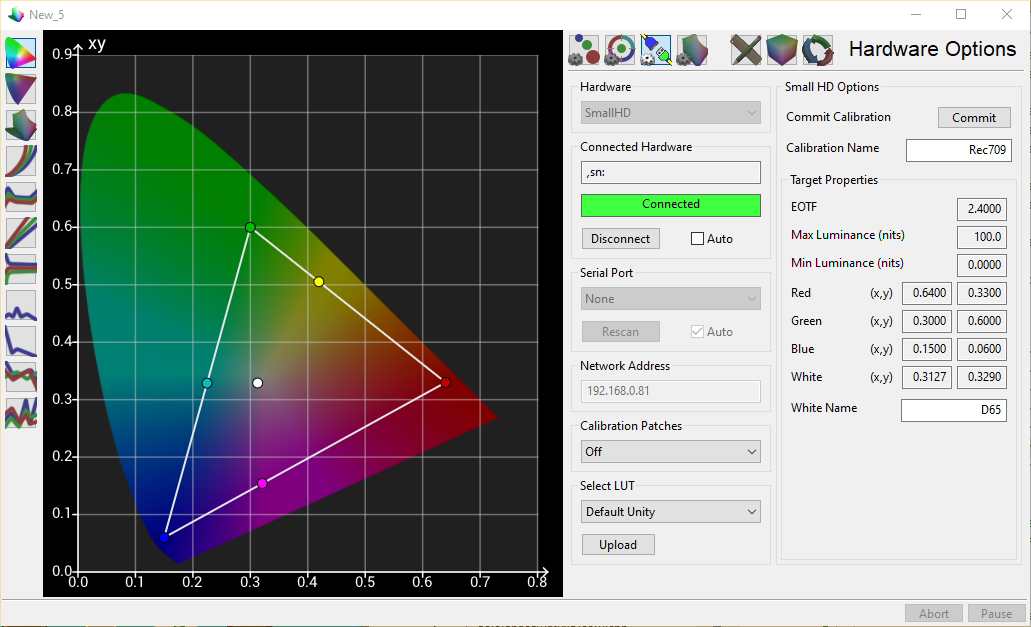
SmallHD calibration is controlled via the Hardware Options menu, accessed via the Profiling window.
For a User Guide on the workflow used for display calibration see the 3D LUT Calibration guide, combined with the specific Konvision information contained within this page.
Initial Setup
- If required, make sure the correct drivers are installed
(If necessary, verify via Windows Device Manager) - Connect the SmallHD monitor to the ColourSpace PC via a USB or network connection as required, as well as a direct video connection with valid signal, and start ColourSpace
- Set the desired set-up options via the Settings menu, as required
- Open a ColourSpace Profiling window, select Hardware Options, and select SmallHD from the Hardware drop-down list
- In the Network Address window enter the required IP address as showm by the monitor's OSD, and select Connect
- To make sure there is no existing calibration data active, select Unity Bypass from the Select LUT option, and press Upload
- Using Calibration Patches select the desired patch option to use for profiling
(If possible, Auto uses the patch settings defined within the ColourSpace Settings window, or else the closest available patch settings
Note: The keyboard 'O' key can be used within the Manual Measure and Hardware menus to quickly Disable/Enable the TPG
With SmallHD monitors, Unity Bypass bypasses the LUT, while a real LUT Upload loads the new LUT data. Set necessary settings, such as Brightness/Contrast/Black-Level, before any LUT Upload.
The Target Properties values are automatically populated by the colour space target set within ColourSpace Settings, while Calibration Name and White Name can be user defined.
Profiling Operation
To profile the SmallHD monitor with ColourSpace navigate to the desired profiling mode - Manual Measure or Display Characterisation.
The screen of the SmallHD monitor will mimic the colour displayed, using the patch settings defined via the Hardware Options and Settings menus.
Profiling can then be performed as normal, using the probe connected to ColourSpace, and with the SmallHD screen displaying the required patches.
Note: An external TPG cannot be used with SmallHD monitors.
LUT Generation
After profiling, a Calibration LUT can be generated as normal within ColourSpace LUT Tools, and saved into the library.
When generating the calibration LUT within ColourSpace, the best accuracy is attained by using a large LUT Generation Size, especially when the LUT Upload will be a combination of 1D LUT and 3D LUT, regardless of the LUT sizes used within the monitor.
(Note: Many hardware manufacturers do not advertise the LUT sizes used.)
The benefit in using a large LUT Size is twofold.
First, when the final uploaded 3D LUT size is small there is still major benefit in using a far larger LUT Generation size within ColourSpace, due to a combination of standard Nyquist over sampling, as well as a more accurate extraction of the final smaller 3D LUT from the larger generated LUT.
And second, setting a larger native 3D LUT size results in increased resolution for any 1D LUT extracted from the 3D LUT and uploaded independently, or as part of the background LUT Upload process.
See: LUT Generation Size.
LUT Upload
With the LUT still held within ColourSpace navigate back to the Hardware Options menu, and select the desired LUT from within the Select LUT options, and Upload.
With SmallHD monitors you can upload LUT after LUT to test each LUT's operation, but no LUT will actually be applied until Commit is clicked. At that point the connection to the monitor will disconnect.