Higher ColourSpace licenses (INF/XPT/PRO LMN/LGN & HTX/HTP) have the ability to natively work with larger LUT sizes than the default 333 cube, including 10243 and beyond.
Using large LUT sizes has a number of potential benefits for both 3D LUTs and 1D LUTs.
LUT Generation Size
With higher ColourSpace license levels, the native LUT size used is defined from the Main Menu, from the Preferences option. Select LUT Generation Size, and enter the required cube size.
Note: ColourSpace is now x64 native, and LUT sizes of 10243 and beyond have proven to work.
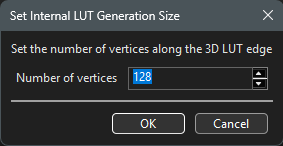
3D LUT Size
The defined native LUT Size is a global setting, meaning that any LUT imported into ColourSpace will be converted into the defined size, so for a LUT to remain at its original size means the native LUT size defined within ColourSpace has to match the imported LUT.
For the generation of large native LUT sizes beyond the initial default 333 size the greater the CPU power and number of threads, the faster the LUT processing. Low power PCs may take an impossibly long time to process very large size LUTs.
Gamut Mapping can slow down LUT generation considerably when enabled on profiles that target a colour space that is larger than the display's native gamut, especially if Gamut Mapping Full is selected.
Even on less powerful PC systems, native LUT generation up to 2563 should work with no issues, and has been tested on an old i3 CPU, 4 GB RAM laptop.
It is always best to select a native LUT Generation Size that is greater than the desired final application size. Generating a LUT of greater size than the actual size of the final LUT can be a significant benefit, due to the likes of Nyquist when down-sampling.
There really is major benefit in generating a native LUT that is far beyond the final LUT size!
3D LUT Size Variations
The LUT size (LUT Granularity) of any applied LUT also has a direct impact on calibration accuracy, depending on the underlying display issues. Therefore displays or LUT boxes with small internal 3D LUT capability can potentially show different calibration accuracy when the ColourSpace LUT is uploaded, if the uploaded LUT is smaller than the LUT generated within ColourSpace.


For displays that have poor underlying volumetric colour variation, including grey scale, the difference will be less colour accuracy throughout, as above.
Note: The above Verification profile resolution for both is identical, to better show the LUT Size variation.
If the display has a stable, linear native response, the main variation will be the level of backlight contamination/colour error within the near black shadow range, due to the lower granularity of the 3D LUT.
Large 3D LUT Generation Size Benefits
When the final uploaded 3D LUT size is small there is still major benefit in using a far larger LUT Generation size within ColourSpace, due to a combination of standard Nyquist over sampling, as well as a more accurate extraction of the final smaller 3D LUT from the larger generated LUT.
This is easier to visualise looking at the 1D LUT graph, but the benefits are volumetric, and so extend throughout the whole 3D LUT volume.
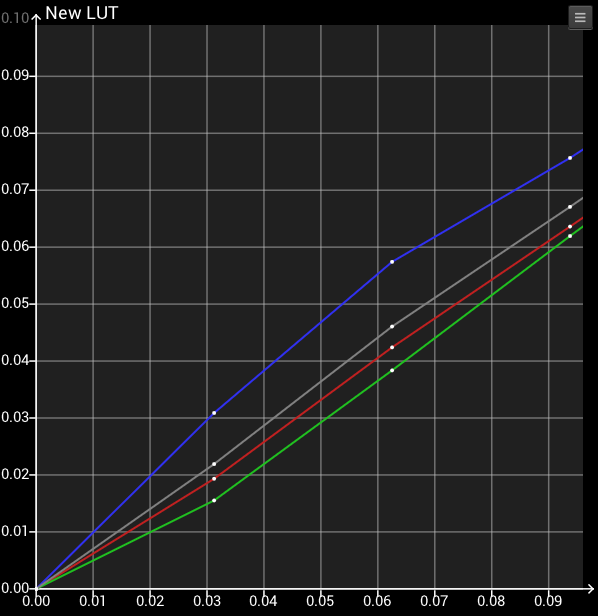
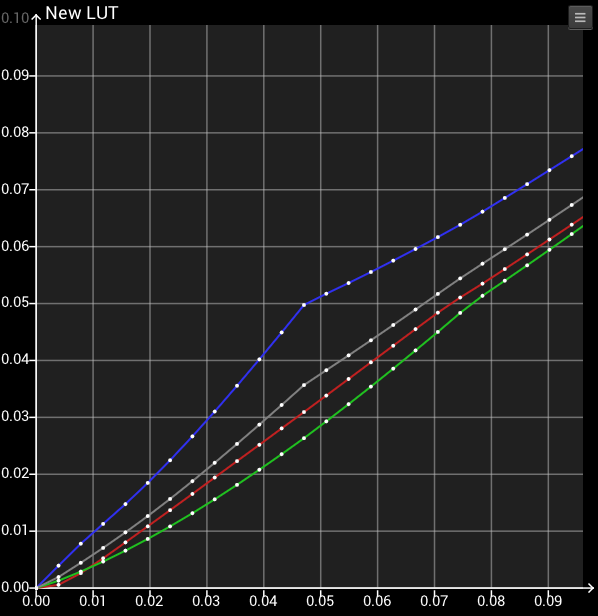
The above 2 LUTs have been generated from the exact same profile, which was a reasonable BCC 213 profile. As can be seen, the smaller 333 LUT generated from the profile has inaccuracies that the 2563 LUT corrects.
When extracting the final smaller LUT for Upload from either of the 2 above results it is entirely possible that the points in the Uploaded LUT will not align with any of the LUT Generation points, meaning that the final Upload small LUT would definitely benefit from being extracted from the larger initial 2563 LUT.
Note: While ColourSpace graphs plot simple linear interpolation between points, the final LUT Extraction uses Tetrahedral interpolation, but the issue of the relative inaccuracy of generating an initial smaller LUT stands.
Using larger LUT Generation Sizes really will improve final calibration accuracy, regardless of the final LUT Upload size.
This is also where the difference between calibration systems becomes concrete. The smaller, less accurate result above is comparable to a system limited to a 333 internal generation size - which is the case with Calman, whose engine is internally capped at 333 regardless of the final uploaded LUT size. ColourSpace can generate natively to 10243 and beyond, and extract the final upload LUT from that far more accurate volume. For the full comparison, see ColourSpace vs Calman.
The difference is even more direct with hardware that uses large 3D LUTs, of 653 or larger. A LUT capped at 333 is then smaller than the 3D LUT the hardware itself uses.
Note: With LUT Sizes over 4843 and beyond the Vertex Data list will not display values. That is presently expected, but has no impact on LUT generation or accuracy.
1D LUT Size Benefits
Following on from the larger 3D LUT Size benefits, an additional obvious benefit of setting a larger native 3D LUT size within ColourSpace is the resulting increased resolution of any 1D LUT extracted from the 3D LUT, for LUT applications where 1D LUTs can be uploaded independently from the volumetric 3D LUT.
For example, with hardware that correctly has the 1D LUT before the 3D LUT, with the 1D LUT being a larger step count than the size of the 3D LUT, setting the native ColourSpace LUT Size to a value greater than the hardware's 3D LUT size will have a direct potential improvement in the accuracy of the 1D grey scale calibration when the 1D Only, or 1D + 3D options are used to Upload the LUTs.
When ColourSpace splits the 3D LUT into 1D and 3D components as part of the Upload, the LUT order within the hardware is taken into account automatically, so the result is correct whether the hardware has the 1D before or after the 3D.
LUT order only becomes important when the 1D and 3D components are uploaded separately by the user, such as when using the Split (1D + 3D) function within LUT Adjustment, or with independent 1D LUT generation. For hardware with the 1D after the 3D the normal two stage workflow will then need to be used, with the 1D LUT being generated and uploaded first, with the display re-profiled with the 1D LUT active, and a 3D LUT generated and uploaded.
As the 1D LUT has already been uploaded, the LUT Tools can be used with the 3D LUT to Null the 1D component of the 3D LUT before uploading, ensuring the 3D LUT doesn't impact the previously uploaded 1D LUT.
For independent 1D LUT generation a large Grey Ramp RGB, or preferably a large Primary & Secondary Ramp patch set can be used with a large patch count, with a full, but smaller, volumetric patch set used for the 3D LUT.
(A smaller 3D LUT, but still larger than the final Upload LUT Size as defined above.)
LUT Upload & Hardware LUT Structure
How a ColourSpace LUT is uploaded depends on the internal LUT structure of each display or LUT box, which varies between manufacturers, and often between models from the same manufacturer. Hardware LUT sizes are often not published, and with some hardware ColourSpace reads the LUT sizes directly from the hardware when it connects.
- Where hardware offers combined Load options, such as 1D + 3D, or 3D + 1D, the ColourSpace 3D LUT is split on Upload, with the 1D component and the remaining 3D component uploaded individually. The combined result is the same as the original 3D LUT, regardless of the LUT order within the hardware.
- Hardware without a combined Load option is not necessarily a single 3D LUT. Some hardware always receives a 1D + 3D split on Upload, as required by its internal processing, even though no Load option is shown.
- Where a 1D Only option is available, the 1D LUT is extracted from the ColourSpace 3D LUT, so its resolution is directly defined by the LUT Generation Size.
- Hardware 1D LUTs are often far higher resolution than the hardware 3D LUT, so a 1D LUT extracted from a small generated 3D LUT will not use the full capability of the hardware.
- Some hardware uses 3D LUTs considerably larger than 333.
In all cases, using a large LUT Generation Size will improve the accuracy of the final uploaded LUTs, regardless of the hardware LUT sizes or structure.