Newer Admesy spectrometers are ColourSpace Integrated.
- ColourSpace INF/XPT/PRO & HTX/HTP & DPS
- Hera Series
- Prometheus Series
Either of the available Admesy drivers can be used with ColourSpace.
ColourSpace Integration
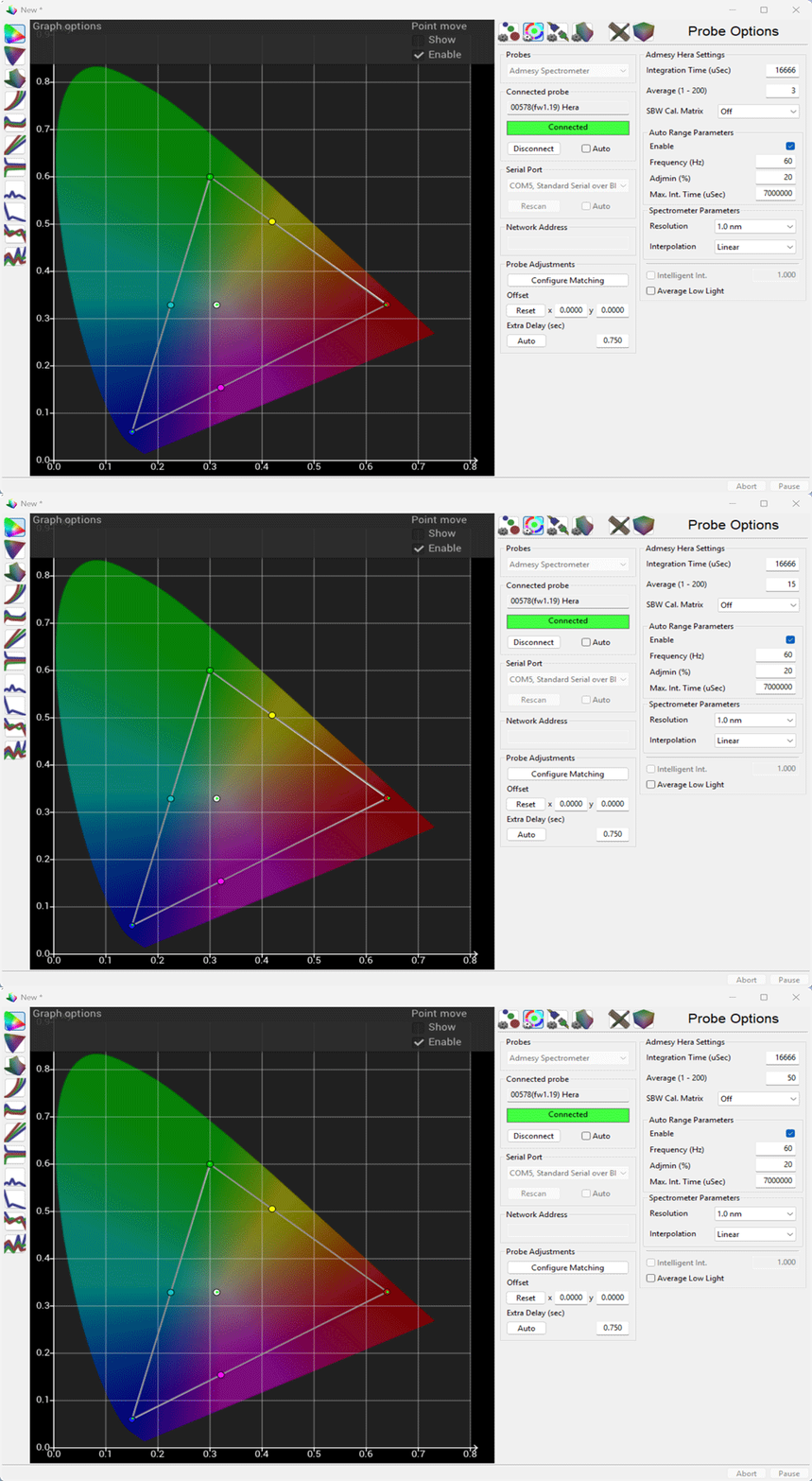
As with all probes, operation and function is controlled via the Probe Options menu, accessed via the Profiling window, with the left-hand side of the menu providing generic probes settings, and the right-hand side settings specific to Admesy spectrometers.

Admesy Spectrometer Settings
The Settings options provide specific Admesy configurations, and will show the model series name of the connected probe.
Full details for all options can be found within Admesy's own documentation.
Note: Power-on startup parameters are as set via Admesy's own software and saved into the probe.
Verify all settings before performing a measurement sequence or probe matching
Integration Time (μSec)
Integration Time (μSec)
Integration Time sets the time taken for any given single measurement, in micro-seconds.
Different values will be required depending on the display being profiled.
(Incorrect settings will cause invalid readings.)
Note: The above setting will be defined automatically when Auto Range is Enabled.
Average
Used to define the number of readings to average.
SWB Cal. Matrix
The drop-down menu provides access to any pre-set matrices held within the Admesy probe.
(Matrix presets are not normally used with spectros.)
Auto Range Parameters
Manually setting Integration Time values can be complex and unreliable. Admesy recommends the use of the Auto Range function to automatically define Integration Time settings during measurement based on the following option settings.
Note: Incorrectly setting any of the following Auto Range parameters will result in inaccurate readings. The values are also used if Auto Range is not enabled.
Enable
The tick box sets Auto Range Parameters Off or On.
Note: Intelligent Integration is disabled when Auto Range is set to On.
Frequency (Hz)
The frame rate of the display being measured, in the range 1 to 255 Hz.
Manually entering the video signal frequency - 60Hz, 50Hz, etc. - is usually preferable.
Adjmin (%)
The minimum level to adjust to, based on the scale of the ADC expressed in %.
(Using too incorrect values can cause clipping.)
Max Int. Time (μSec)
Sets a clip point beyond which integration will cease to operate, to prevent excessively long readings.
Spectrometer Parameters
Specific settings used with Admesy Spectros.
Resolution
Set the spectrum output resolution, using the defined Interpolation method.
Interpolation
Set the spectrum interpolation method from the available drop-down list.
Additional Settings
Additional settings settings available with supported probes.
Intelligent Integration
Intelligent Integration sets the nits level under which Intelligent Integration will be used.
This provides the best possible low-light measurements, without impacting reading speeds at luma levels above the set value, so maintaining overall speed of profiling.
Average Low Light
Average Low Light is a probe generic option, that averages multiple readings in low-light situations using an advanced algorithm built into ColourSpace. The algorithm varies based on the probe in use to provide the best possible results.
Average Low Light should not need to be used when Intelligent Integration is active.
Probe Adjustments
Probe Adjustments are generic probes settings, with consistent operation regardless of the probe in use.
Configure Matching
Configure Matching
Probe Matching is used to match a Tristimulus to a Spectrometer, increasing the profile accuracy.
There are three different methods available for probe matching - ColourSpace's unique 4 Colour Volumetric Matching (FCVM), and Multi-point Volumetric Matching (MPVM), with the option to force the use of the traditional simple matrix method (FCMM).
Offset
Probe Offset enables a user to manually enter offset values for different probes/display combinations.
Perceptual Colour Match is a preferable approach.
Extra Delay
Extra Delay sets a delay time after the patch has changed before probe measurement starts, and can be set automatically via the Auto button, and manages signal path delays in the image pipeline.
Note: Some probe/settings/display combinations will not work accurately with the Auto function