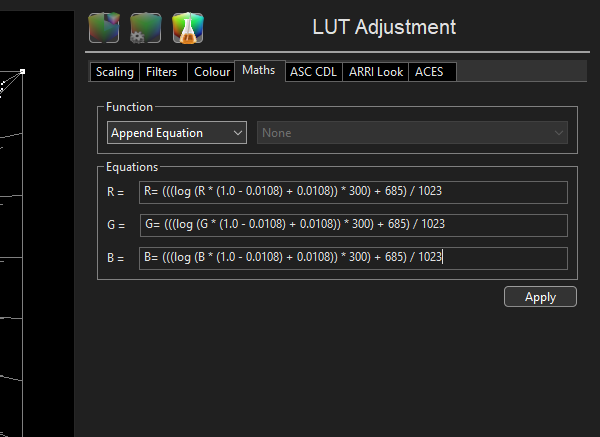
Higher ColourSpace licenses (INF/XPT/PRO LMN/LGN & HTX/HTP) have access to a range of LUT Adjustment tools, including using Maths Equations for LUT manipulation.
The options are extensive and extremely powerful.
Maths Equations
Within LUT Adjustment, the Maths Equations options opens a menu into which mathematical calculations and arguments can be entered, allowing direct LUT manipulation, as either Append or Prepend operation.

There are 3 separate text boxes, and the operation of each is identical. The default startup state is:
- R= R
- G= G
- B= B
Which will do nothing, as output equals input.
Any combination of the following operators can be used in generating an equation, effectively just like a normal calculator:
- +,-,*,/ add, subtract (negate), multiply and divided
- ^ to the power
- () brackets
- min(a,b), max(a,b) minimum or maximum of 2 values
- sqrt(a) square root of a value
- abs(a) absolute value
- (a cond b) ? trueExp : falseExp (cond is the condition, can be =, !=, <, >, <=, >= (If true, returns the value of the trueExp else returns the value of the falseExp)
(Alternatively: (if(a cond b))
There is no ELSE for if. If the condition is true, it returns 1.0. if it is false, it returns 0.0. Therefore, you multiply the function buy the if(). Alternatively, it is possible to use 1.0 - if() to implement the ELSE type operation. - log(a) returns the log to base 10 of a
In addition to these, you can use R, G, B to represent the current LUT's r or g or b channel value.
All of the key words and R,G,B are case sensitive, so if is ok, but If and IF are not good. You can use as many R,G,B as you like in ANY channel process. You can also use constant values.
All maths is done floating point, so an integer value of 65535 in 16-bit is represented as 1.0
An example could be:
R= (R *0.28) + (G * 0.7) + (B *0.02)
G= (R *0.28) + (G * 0.7) + (B *0.02)
B= (R *0.28) + (G * 0.7) + (B *0.02)
Putting these 3 lines into the maths engine, will give a LUT that produces a weighted monochrome image.
Another example could be:
(R > 0.1496582) ? ((((10.0 ^ (R - 0.385537)) / 0.2471896) - 0.052272) / 5.555556) : ((R - 0.092809) / 5.367655)
(G > 0.1496582) ? ((((10.0 ^ (G - 0.385537)) / 0.2471896) - 0.052272) / 5.555556) : ((G - 0.092809) / 5.367655)
(B > 0.1496582) ? ((((10.0 ^ (B - 0.385537)) / 0.2471896) - 0.052272) / 5.555556) : ((B - 0.092809) / 5.367655)
Which is the ARRI formula for LogC EI800 to linear data, extrapolated from:
t > 0.1496582 ? (pow(10.0, (t -0.385537) / 0.2471896) -0.052272) / 5.555556 : (t -0.092809) / 5.367655
To meet the formula requirements for the ColourSpace maths engine.
And for Linear to sRGB encoding:
R= (R <= 0.0031308) ? R * 12.92 : 1.055 * (R ^ (1.0/2.4)) - 0.055
G= (G <= 0.0031308) ? G * 12.92 : 1.055 * (G ^ (1.0/2.4)) - 0.055
B= (B <= 0.0031308) ? B * 12.92 : 1.055 * (B ^ (1.0/2.4)) - 0.055
Which is the gamma formula for sRGB from linear data, extrapolated from:
x <= 0.0031308 ? x * 12.92 : (1.055 * pow(x, 1/2.4)) - 0.055
( if(x <= [input], [result if true], [result if false]) )
And for Linear to Rec709 encoding:
R= (R < 0.018) ? R * 4.5 : 1.099 * (R ^ (0.45)) - 0.099
G= (G < 0.018) ? G * 4.5 : 1.099 * (G ^ (0.45)) - 0.099
B= (B < 0.018) ? B * 4.5 : 1.099 * (B ^ (0.45)) - 0.099
Which is the gamma formula for Rec709 from linear data, extrapolated from:
x < 0.018 ? (x * 4.5) : 1.099 * pow( x, (0.45) ) - 0.099
Note: The sRGB and Rec709 formulas are capture/encoding standards, and are NOT correct for display calibration. For both sRGB and Rec709, display calibration is always a simple Power Law gamma!
(Gamma 2.2 for sRGB, and 2.2 to 2.4 for Rec709...)
And for Linear to Cineon Log:
R= (((log (R * (1.0 - 0.0108) + 0.0108)) * 300) + 685) / 1023
G= (((log (G * (1.0 - 0.0108) + 0.0108)) * 300) + 685) / 1023
B= (((log (B * (1.0 - 0.0108) + 0.0108)) * 300) + 685) / 1023
As you can have different formulas in each colour channel, the actual possibilities are very powerful!


