Steve:
The settings accuracy was information provided by Admesy, and was verified on a Hera and PCM2X colourimeter.
You probably need to try different Gain/Adjmin/etc. values as they will change with different monitor settings.
You will definitely see the same issue.
Whoever from Admesy gave you this info was completely wrong. Or maybe it was a miscommunication.
Auto-range This is ALWAYS ON. The OFF setting is for measurements where you know in advance what you measure. Aka production lines. You can use this OFF in AV calibration if you really know what are you doing, to drive the energy saturation of sensor to its max, but below clipping. 99,9999% of users will want Auto-range = ON
Adjmin is just a setting to tell the probe what sensor energy saturation you want, aka precision. On a PCM2X you set it at 20 for AV calibration and you are done. It has nothing to do with monitor settings. It is kinda similar to presets in CRI probes. Obviously if you set it lower it begins to have variability, the same as CRI. Reason you maybe want it to set it lower is if you don't require high precision, but you want to detect failures. For example on a production line you want to measure 1000 phones in one hour, but want to detect which one shows garbage. Hence you need the fastest read time. The lower adjmin is, the faster the probe measures.
Gain / Integration time You NEVER touch Gain or Integration time on an Admesy probe when using Auto-range = ON. Both are driven by the auto-range mechanism. The reason they exist as a parameters is when you know in advance what luminance you are measuring and you work with Auto-range = OFF. Thus you will see the fastest measurement for that situation. This scenario is used in production lines, in factories. In AV calibration don't touch Gain or Integration time. There is no need to.
Maximum Integration Time. You set it at 1 second and forget about its existence. It is just a safety setting.
Frequency. This one needs to be set at video frame rate.
Average This setting is the only one you can play with if you want to experiment. I usually go with Avg = 5 for ultra fast interactivity or Avg = 20, hardcore precision. The probe is so fast it barely makes a difference.
So to recap on a
PCM2X:
Auto-range = ON
Adj. min = 20
Max. Int. Time = 1 sec
Frequency = 24/25/30/60 whatever it is the case
Avg = 5 or 20 (this is what I use)
As you can see there is
NO NEED "to try different Gain/Adjmin/etc. values as they will change with different monitor settings"
Now, that doesn't mean you
CANNOT try different settings.
YOU CAN. But all you will do will just lower the precision of the probe which in AV calibration doesn't make sense. We have to remember that these probes are built for various industries where maybe the highest precision is not needed and where faster speed with lower precision as a trade off makes more sense. This is valid for all probes from CRI/Jeti as well where they have different presets which trade speed for precision.
Here is a CR-250 I rented a few months ago, out of curiosity.
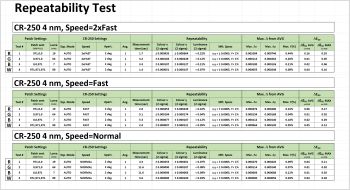
On the red patch on SPEED=2xFast it spits out garbage, on SPEED=Fast its meh, on SPEED=NORMAL is fine. Does this mean the CR-250 is a bad probe?
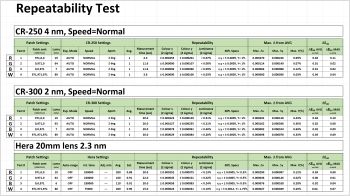
NOT AT ALL, you just have to set it at the correct precision. BTW, the same thing happens with the CR-300. A well known calibrator told me he always uses its CR-300 on SPEED=normal as on his own tests the red patch had too much variability on faster speeds. The same is with HERA, the red patch is the slowest to clean up. But using them all at correct settings, they are perfectly fine.

 Page 2 of 2 : « Previous 1