The Gamut Coverage value generated by ColourSpace provides a true volumetric percentage for the display gamut coverage compared to the target colour space, based on the code value range.
The 3-dimensional ColourSpace graphs accurately portray any display's true gamut coverage, and from the 3-dimensional data a valid gamut coverage value can be defined.
See also Calibration Gamut Coverage as well as Matrix Profiling & Calibration.
Volumetric Gamut Coverage
One of the key verification capabilities of ColourSpace is its ability to report, and graphically represent, Volumetric Gamut Coverage.
Traditionally, gamut coverage has been calculated using a 2-dimensional CIE diagram, plotting the widest primary RGB colour points against the target colour space. Consequently, the reported % Gamut Coverage is wildly inaccurate, as with many displays the available gamut changes with brightness.
The 3-dimensional ColourSpace graphs accurately portray any display's true gamut coverage, and from the 3-dimensional data a valid gamut coverage value can be defined.


In the above 2D CIE chart, the display's gamut coverage appears to be close the target P3 colour space, with an expectation for 90%, or greater, gamut coverage figure, as would be generated by most calibration systems.
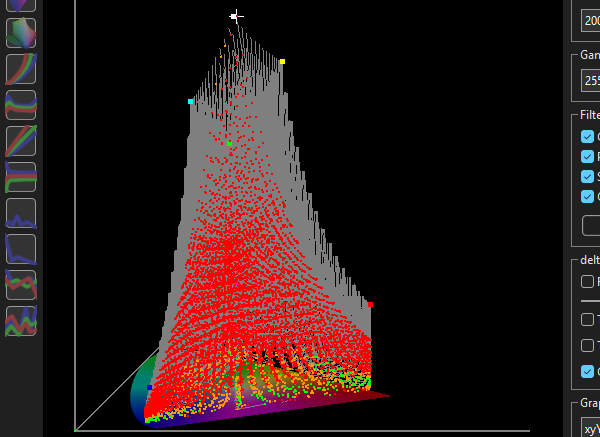
However, ColourSpace's 3D CIE graphs shows the display's gamut reduces dramatically as brightness increases, as shown by the grey areas of the graph. The true gamut coverage value is 60%, as is accurately calculated by ColourSpace using the code value range to define the gamut distribution.
The tangent/error lines in the 3D CIE graph define the issues as being a reduction in brightness/luminance as the display gamut/saturation attempts to increase, resulting in both a loss of gamut at higher brightness signal levels, caused by the reduction in brightness.

With many modern display technologies, an accurate 3-dimensional gamut coverage value is the only way to understand the true underlying capabilities of any given display.
Within ColourSpace the Gamut Coverage option in the Manual Measure menu will calculate a true volumetric gamut coverage value, based on the selected profile measurements, the target colour space, and the code value range.
The more points in the actual profile, the more accurate the volumetric Gamut Coverage value will be. Invalid profiles, for example lacking 100% RGB values, will generate invalid Gamut Coverage values.
For a volumetric profile, rather than a Quick Profile, a minimum 33 profile is required to generate a Gamut Coverage value.

The above shows a small volumetric cube profile vs a larger volumetric profile on the same display, with the larger profile generating a more accurate gamut coverage value.