The traditional way to report gamut coverage for a display is by measuring peak 100% primary Red, Green, & Blue values, and to calculate the area the resulting triangle covers.
But that approach can be wildly inaccurate, for more than the obvious issue of using a 2D graph vs a volumetric data set measurement.
See also Volumetric Gamut Coverage as well as Matrix Profiling & Calibration.
Calibration Gamut Coverage
Measuring gamut coverage, using just the peak chroma values, is not a good way to measure calibration accuracy, as greater peak chroma gamut coverage does not always equate to better accuracy.


The native display gamut suggests it can cover a fairly large percentage of the target Rec709 colour gamut, although the native white is cyan, with black being very blue.
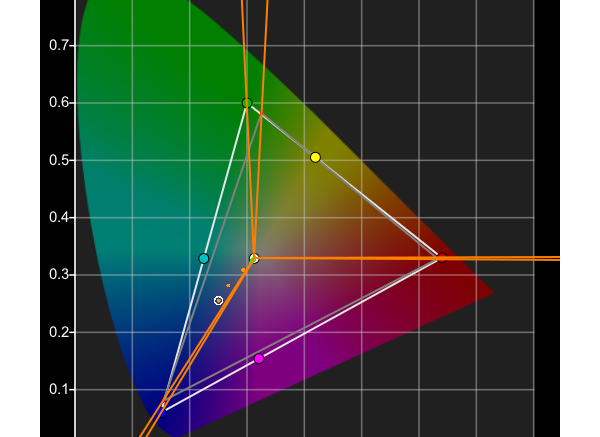
Calibration with Gamut Mapping Disabled appears to show that a wide gamut coverage is possible, but note the peak green measurement is not correct, as it is off-axis with respect to the target colour space. The Green Hue is inaccurate.
Calibration with Gamut Mapping Enabled shows gamut coverage as being lower, but the peak green measurement is accurate with respect to the target colour space. The Hue is now correct.
(The small inaccuracy in the peak green hue plot is due to the way Gamut Mapping has to include some hue/saturation variation in the Out Of Gamut colours.)
When the No Gamut mapping result is plotted directly in comparison to the target colour space and with Gamut Mapping Enabled, the calibration inaccuracy in hue is obvious.
The assumption that is all to easy to make is that when calibrating with Gamut Mapping Enabled the area outside the peak primary gamut triangle is going to be cut off, and therefore drastically reduce the display's colour range.
This is not correct, as the gamut triangle is ONLY showing the values for the peak chroma values, not the gamut coverage for any other colours, and ColourSpace will calibrate each potential colour separately, maximising the total volumetric calibration of the display.

As can be seen, with Gamut Mapping Enabled, the full available gamut of the display is calibrated, not just the gamut with the peak RGB values.